Listings
Apple Updates Added to Suggestions
Customers can now review and manage updates made by Apple for their listings directly in the Suggestions section of the Knowledge Graph.
Apple may occasionally update a location's hours or business status based on third-party data sources. With this update, those changes are surfaced as publisher suggestions in Yext, allowing customers to review and decide whether to accept or reject them before they are finalized.
If a suggestion is accepted, the update will sync into the Knowledge Graph. If it is rejected, the change will be reverted on Apple Maps so the listing reflects the data stored in Yext.
To utilize this feature, your Apple Business Connect (ABC) account must be delegated to Yext. See the Link Your Apple Account documentation to learn more.
Confirm Sync Endpoint Update
The Confirm Sync endpoint no longer requires entity IDs to be provided. If no entity IDs are included in the request, Yext will automatically identify and confirm sync for all listings associated with a specified publisher. This makes it easier to resolve Confirm Sync update requests in bulk.
See the Listings: Confirm Sync API documentation to learn more.
Announcement: Decommission Legacy Google and Facebook Analytics Metrics
Starting April 1, 2026, Yext will begin deprecating several legacy Google and Facebook analytics metrics that no longer return data from publisher sources.
API requests containing the following metrics will no longer return data, and the metrics will be ignored if included in requests:
GOOGLE_SEARCHESGOOGLE_SEARCH_VIEWSGOOGLE_MAP_VIEWSGOOGLE_CUSTOMER_ACTIONSGOOGLE_PHONE_CALLSGOOGLE_FOLLOWERSFACEBOOK_CTA_CLICKSFACEBOOK_TALKING_ABOUT
On May 13, 2026, these metrics will be fully removed from Yext. At that time, any requests referencing them will fail.
We recommend updating any reporting pipelines, dashboards, or integrations that reference these metrics before the removal date.
New Verifier Field Accuracy Filter in All Listings
Accounts with access to Verifier Field Accuracy can now filter listings to more easily identify and analyze verification-related issues.
On the All Listings screen, users can select a new Verification filter option from the Issue Type filter dropdown.
Publishers
Built-In Open Date Field for Yelp
In the April '25 release, we launched a built-in open date field within the Knowledge Graph. Previously, this field automatically sent open date data to Google. Now, this data will also be automatically sent to Yelp.
If you are already utilizing the custom field, we will still send this data to Yelp, and no additional action is needed. However, for any new updates, we recommend using the built-in field. If both the custom field and built-in field are added to an entity, we will send the built-in field to Yelp.
New Healthgrades Syndicate Publishers
Sharecare, Healthline, and Medical News Today syndicate content from Healthgrades. As a result, provider data published to Healthgrades may also appear on these sites, extending the reach of your listings.
Publisher Deprecation: 360 Search
360 Search has been removed from the Yext Publisher Network. We will no longer be syncing data to this publisher.
Publisher Deprecation: Dianping
Dianping has been removed from the Yext Publisher Network. We will no longer be syncing data to this publisher.
Publisher Deprecations: Events.com and Facebook Events
Events.com and Facebook Events have been removed from the Publisher Network. We will no longer be syncing data to these publishers.
Reviews & User-Generated Content
Review Exports to SFTP
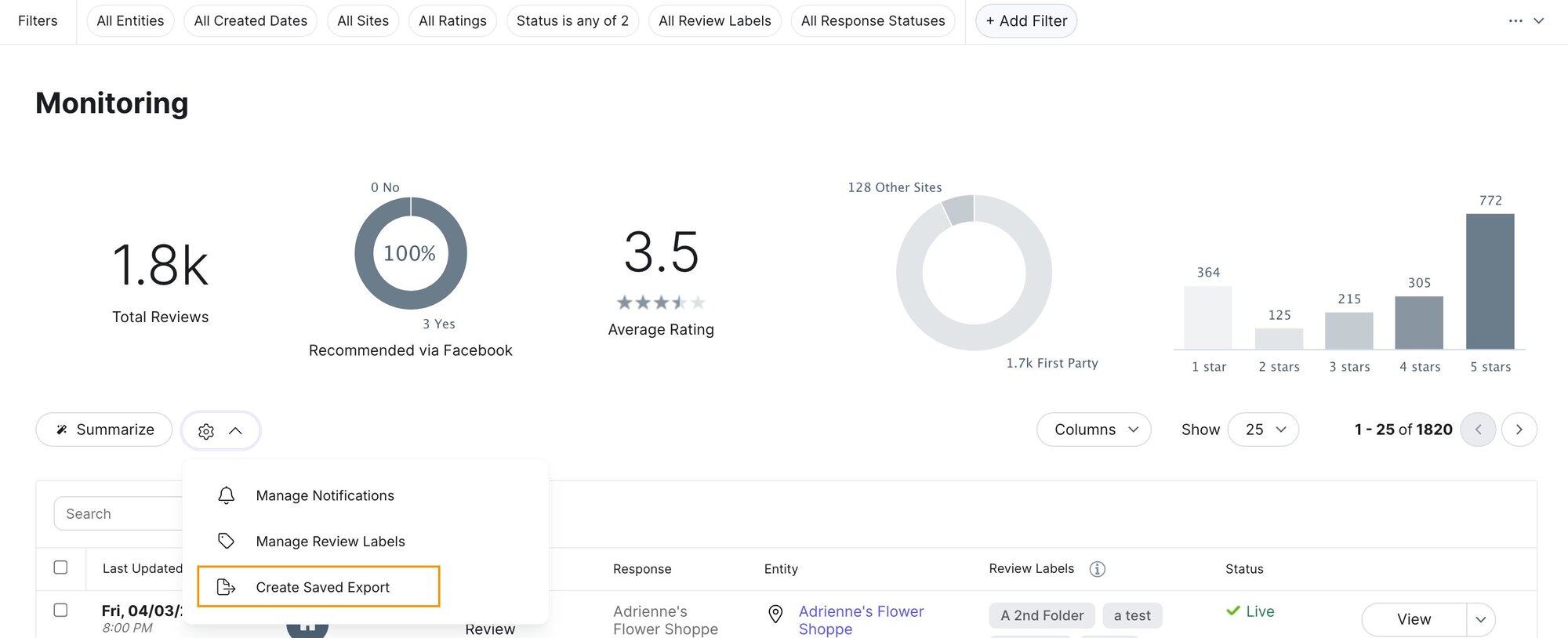
Users can now schedule automated exports of reviews directly to a secure SFTP destination, eliminating manual data handling and meeting strict enterprise and healthcare security requirements. This feature allows teams to seamlessly deliver up to 1 million reviews per file into external BI tools, analytics platforms, or compliance reporting systems.
To get started, apply your desired filters on the Review Monitoring page and select Create Saved Export. From there, you can configure your SFTP credentials and set a recurring delivery frequency, ranging from hourly to monthly. You can manage, edit, or manually trigger these schedules by navigating to Reviews > Configuration > Saved Review Exports.
See the Export Reviews article to learn more.
Pages
Unified Locator
Brands can now create a single, comprehensive search and map experience that includes all ways to engage with their business, regardless of whether every location has a dedicated landing page. This update allows you to surface entities like ATMs, department store counters, or authorized retailers alongside your flagship locations in one unified interface.
Unified locators support the following:
- Multi-Source Search Scopes: You are no longer restricted to a single Page Group's entity scope. You can now add multiple entity sources to a locator, including "Entity Scopes" for locations without pages and "Page Group Scopes" for locations with pages.
- Standalone Locators: You can now create a Locator as its own standalone Page Group. This is ideal for brands that need a high-quality directory experience but do not require individual landing pages for every point of interest.
- Customized Result Cards and Pins: To help users differentiate between result types, you can now style result cards and map pins independently for each scope. For example, you can display a unique icon for ATMs versus Branches, or add static text like "Authorized Retailer" to specific result cards.
This feature is available with Pages 1.1.0 or later.
See the Build a Locator documentation to learn more.
Advanced Directory and Path Customization
We have introduced new configuration options within the Pages UI to give you total control over your directory structures and URL formatting. These updates make it easier to build SEO-friendly, localized sites that match your brand's specific geographic needs.
Skip Directory Levels: You can now bypass specific Directory Manager levels, such as "Region", directly within the interface. This is particularly useful for international sites where certain administrative levels are not relevant to the local geography. By skipping these levels, you can create shorter, more intuitive URL paths and a cleaner navigation experience for your users without needing to adjust backend configurations in the Admin Console. See the Build a Directory documentation to learn more.
Flexible Locale Path Prefixes: To improve global SEO and URL consistency, Yext now enforces locale code prefixes (e.g., /en/, /de/) on all secondary language paths for both directory and location pages. Additionally, we've added an optional toggle that allows you to include the locale prefix on your primary language paths as well. This ensures a uniform URL structure across your entire site, making it easier for search engines to crawl and index your localized content.
Previously, complex directory structures often forced "empty" levels into your URLs, which could hurt SEO and user experience. With these new UI-driven controls, you can tailor your site's architecture to the exact needs of each market while ensuring your language-specific pages are perfectly formatted.
This feature is available with Pages 1.1.0 or later.
Unblock Editor During Deploys and Errors
Users can now continue working in the Pages layout editor, theme editor, and page group configuration screens during slow deploys or error states.
A deployment indicator provides status context across these screens. During deploys or errors, the publish button for layout and theme changes is disabled, though users can still make and save local changes.
Visual Editor Improvements
We've rolled out a series of enhancements in library version 1.1.0. Update your library to access these improvements today. Learn how in the Update Your Library help article.
Locator Enhancements
- Distance display settings. A new Distance Display setting on the Locator component gives you control over how distances appear on location cards. Choose from Distance from user (default), Distance from search (shows distance from the location the visitor searched, such as a zip code or city), or Hidden (removes distance values entirely).
- Privacy-first cookie consent. When a visitor declines cookies via your consent management platform, the locator map is now automatically hidden and replaced with a message and a link to reopen the CMP to update their preferences. A new site setting also lets you control whether Yext Analytics requires explicit opt-in based on your consent banner.
Components and Content
- New Text component. A lightweight Text component is now available for elements that don't require full rich text capabilities, such as FAQ questions, product prices, and team member titles. It supports embedded fields and basic font styling without the overhead of a rich text editor. Note: the existing Body Text component has been renamed to Rich Text to clarify the distinction. (Requires the Advanced Core Component feature flag.)
- Show/hide options for component elements. You can now toggle the visibility of individual elements within any component, including phone and email icons, giving you precise control over what appears on the page without deleting content.
- Default content for new locales. When you add a new locale to a page group, layouts and components are automatically pre-populated with default data, so you're not starting from a blank slate.
- CTAs as buttons for custom JavaScript. CTAs can now be configured as buttons that trigger custom JavaScript, perfect for cookie consent flows, modal triggers, and other custom interactions.
Styling and Design
- Default header font in global styles. A new top-level header font setting lets you select a single font that automatically applies across all heading levels (H1–H6), so you no longer have to set each level individually.
- Enhanced header controls. New options include a hamburger menu for desktop and tablet viewports, an "always collapsed" option for primary navigation links, and expanded link styling controls including font weight, font size, color, and alignment.
- Breadcrumb customization. You can now hide the current page text in your breadcrumb trail, or replace it with a value from an entity field.
- Address component show/hide options. New options let you independently hide the country and region from displaying in addresses across your pages and Locator.
Platform
Remove Screens Analytics
The following Screens analytics metrics, dimensions, and filters will be removed from the Yext platform and API:
-
Metrics: Screens Clicks (
SCREENS_CLICKS), Screens Page Views (SCREENS_PAGEVIEWS), Screens Searches (SCREENS_SEARCHES), Screens Unique Visits (SCREENS_UNIQUEVISITS) -
Dimensions: Screens Page Type (
SCREENS_PAGE_TYPE), Screens Click Type (SCREENS_CLICK_TYPE), Screens Search Type (SCREENS_SEARCH_TYPE), Screens Referrer (SCREENS_REFERRER), Screens Platform (SCREENS_PLATFORM) -
Filters: Screens Click Type (
screensClickType), Screen Page Type (screensPageType), Screens Search Type (screensSearchType), Screens Referrer (screensReferrer), Screens App Platform (screensAppPlatform)
If you have any integrations or reports relying on these analytics, they will need to be updated.
Search
Configurable Autocomplete Limits
Admins and developers can now customize the number of results displayed in search autocomplete, providing greater control over the search UI density. Previously hardcoded to a maximum of 10 results, the autocomplete limit can now be set to any integer between 1 and 100 to better align with your site's design and user experience needs.
Depending on your development environment, you can configure this limit in three ways:
- Theme: Add the
autocompleteLimitproperty to the specific vertical within theverticalsToConfigobject (for universal search, apply this inindex.json). See the Shared Vertical Settings (verticalsToConfig) reference for more information. - React SDK: Use the two new optional properties on the
SearchBarcomponent:universalAutocompleteLimit(number) andverticalAutocompleteLimits(a record mapping vertical keys to numbers). See SearchBar reference for more information. - API: Specify the new
limitparameter in both the Universal and Vertical Search Autocomplete endpoints. See docs for the Universal Search: Autocomplete and Vertical Search: Autocomplete endpoints.
While the limit is now flexible, we continue to recommend a value of 10 for optimal performance and readability.