Listings
Daily Scan for Google Business Profile Bulk Verification Status
Previously our bulk verification monitoring page used to check verification status once a month. Now, the system will scan daily to confirm bulk verification status.
This change does not affect any currently bulk-verified accounts, or any part of the bulk verification process. For more on bulk verification in Yext, see the Bulk Verification for Google Business Profile help article.
Publishers
New Publisher Integration: ProjectMatchPro
ProjectMatchPro will be added to the Yext Publisher Network on August 6, 2025.
- Country Support: US
- Language Support: en
- Supported Entity Types: Location
TikTok Country Expansion
For our TikTok integration, we have added support for the following countries:
- Estonia, Latvia, Lithuania, Mexico, and Spain
WhereTo Country Expansion
For our WhereTo integration, we have added support for the following countries:
- Albania, Antarctica (Bouvet Island), Bolivia, Botswana, Cocos (Keeling) Islands, Christmas Island, Ecuador, Western Sahara, Eritrea, Ghana, Greenland, Gambia, Guinea-Bissau, Kyrgyzstan, Kiribati, Comoros, Laos, Lesotho, Moldova, Saint Martin (French part), Myanmar (Burma), Malawi, Mozambique, Norfolk Island, Nauru, Papua New Guinea, Paraguay, Rwanda, Solomon Islands, Svalbard and Jan Mayen, Sierra Leone, Somalia, South Sudan, São Tomé and Príncipe, Sint Maarten (Dutch part), Eswatini (Swaziland), Turkmenistan, Tonga, Tuvalu, Vatican City, Vanuatu, Kosovo, Zimbabwe
Cylex Country Expansion
For our Cylex integration, we have added country support for the following:
- Portugal
Reviews & User-Generated Content
Rolling Review Volume Metric
We’ve released a new Reviews metric to enhance your competitive intelligence: “Rolling Review Volume”.
This metric displays the cumulative review volume for your entities and competitors, giving you crucial insight into the online presence and customer engagement of both your brand and of your competitors. Competitor data is based on the most recent Competitive Intelligence scan before your selected date range; your entity data includes all reviews within your selected date range. This metric is available for all time for accounts with Competitive Intelligence.
For more information, check out the Reviews Metrics reference doc.
Export Review Insights
We've made it easier to share your valuable customer feedback! You can now export themes and summaries directly from Review Insights, allowing you to seamlessly share key takeaways with stakeholders who don't use Yext.
From the Review Insights screen, you can export themes and summaries both individually and in bulk. All four options can be exported as PDFs. You can also export all reviews for an individual summary as a CSV. Bulk exports will display each theme or summary on its own page. All exports will respect any filters applied to the page.
To export:
- An individual theme: Select a theme, then click the download icon in the theme drawer.
- Themes in bulk: Select the themes you want, then click the download icon in the action toolbar that appears.
- An individual summary: Select a summary, click the menu icon, and choose whether to download the summary as a PDF or all reviews of the summary as a CSV.
- Summaries in bulk: From the main summary panel, click the download icon.
For more information, check out the Review Insights Screen unit.
Word Cloud in Sentiment Analysis
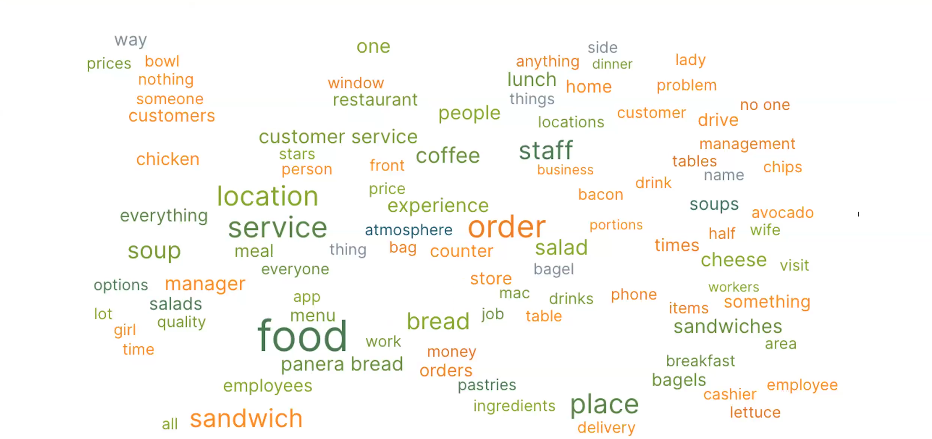
We're excited to release the Sentiment Word Cloud! The Sentiment Analysis screen already identifies the most common keywords and their sentiment from your reviews. Now, the Sentiment Word Cloud provides an intuitive visual representation of this analysis, quickly highlighting key themes and their associated sentiment.
You'll find the new "Sentiment Word Cloud" section directly on the Sentiment Analysis page. This word cloud displays up to 100 of the most frequently used words derived from your review sentiment keywords. The size of each word in the cloud indicates its frequency, while colors represent its sentiment score, using the same scale you’re already familiar with on the page. This gives you immediate insights into customer feelings.
For more information, check out the Sentiment Analysis Dashboard unit.
Upload Review Generation Opt-Outs
We're excited to introduce a new feature that makes managing your review generation incredibly efficient: you can now upload opt-out lists directly within the platform.
Now you can easily add email addresses and phone numbers to your opt-out list, ensuring those contacts won't receive future review generation requests. This is especially helpful when migrating data or managing lists from external sources.
To upload an opt-out list, navigate to the Review Generation View Invites screen. Click on the More Actions dropdown and select Upload Opt-Outs. Input a comma-separated list of email addresses and phone numbers, and we'll handle the rest.
For more information, check out the Sending Review Generation Invitations unit.
New Reviews Publisher Integration: Caring.com
Caring.com will be added to the Yext Publisher Network for Reviews on August 6, 2025.
- Country Support: US
- Language Support: en
- Supported Entity Types: Location, Healthcare Facility
New Reviews Publisher Integration: A Place for Mom
Caring.com will be added to the Yext Publisher Network for Reviews on August 6, 2025.
- Country Support: US, CA
- Language Support: en
- Supported Entity Types: Location, Healthcare Facility
New Reviews Publisher Integration: Better Business Bureau
Better Business Bureau will be added to the Yext Publisher Network for Reviews on August 6, 2025. Historical reviews will only be available from July 16, 2024 and later.
- Country Support: Canada, United States
- Language Support: en
- Supported Entity Types: Location, Hotel, Healthcare Facility, Atm, Restaurant, Financial Professional
Social
Edit Date and Time of Scheduled Posts
You can now edit the date and time of scheduled social posts via the Calendar and Tasks Inbox.
Within the Social Calendar, select a post marked as scheduled or pending approval to see the post details. Click the … icon in the top right of the modal to be directed to the post edit screen, where you can update the date and/or time and reschedule the post.
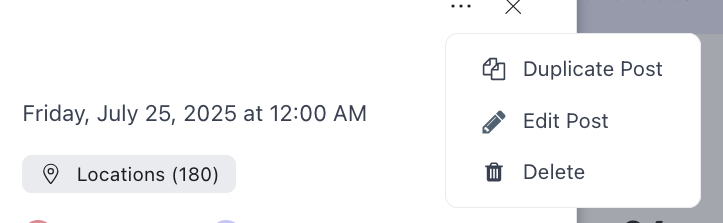
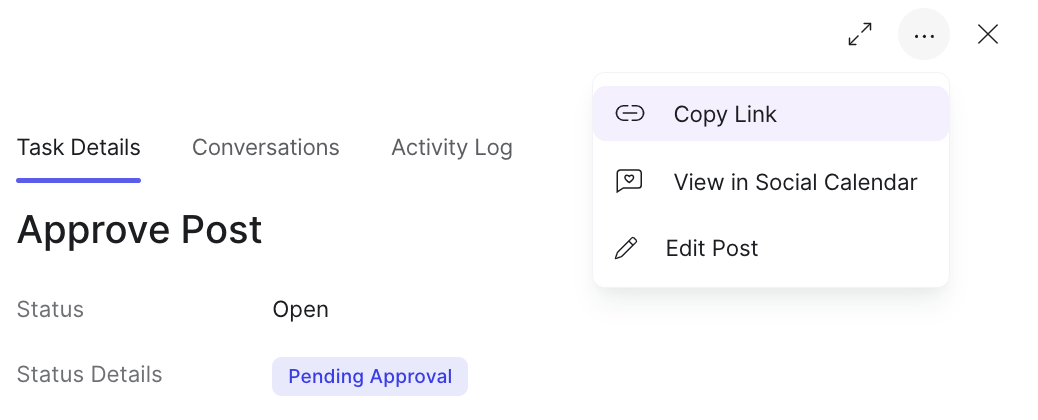
You can also make date and time updates by navigating to Inbox > My Tasks. When you select a scheduled Post Approval task from the list, you can opt to edit the content by selecting the Edit button in the Post Content section or by clicking the … icon in the top right corner and choosing the Edit Post option. You will be directed to the post edit screen to update the date/time and resubmit the post for approval.
See the Create and Edit a Post documentation to learn more.
This feature is available as part of Yext Social.
Block Users in Bulk and Block via DM
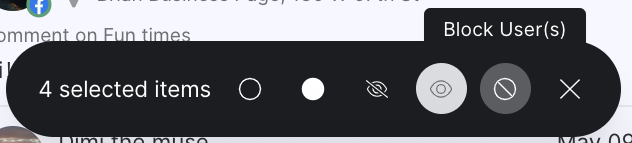
We have added the ability to block users via the Direct Messages tab of the Comments and DMs screen. We have also added the ability to block users in bulk from both the Comments and Direct Messages tabs.
When you select the checkboxes next to comments or direct messages, a “Block Users” option will appear at the bottom of the screen.
See the Comments and Direct Messages documentation to learn more.
This feature is available as part of Yext Social.
New Facebook Page Total Followers Metric
We have added a Facebook Page Total Followers metric that counts the total number of people who follow your page. This is calculated as the number of follows minus the number of unfollows over the page's lifetime.
This metric is available in Report Builder within the Social tab and the Reports API endpoint.
See the Social Metrics and Dimensions documentation to learn more.
This feature is available as part of Yext Social.
Pages
The below features are for the latest version of pages, Pages for Marketers.
Structuring and Viewing Knowledge Graph Entities for Location Pages
We're excited to announce enhancements to how you structure and view Knowledge Graph entities for your Location Pages! This update streamlines the process of managing content for your pages and ensures you only see the most relevant information when editing.
Simplified Content Structuring: When you create a page group for a set of entities, custom fields are now automatically added to those entities. These fields can be populated with data and then easily bound to corresponding components in the page editor, making content management more intuitive.
Focused Entity Viewing: The "Edit [entity type] content" button at the top of the editor page now takes you to a filtered view within entity edit. This view only displays the fields actively used by your page layout, helping you focus on the content most relevant to your specific page.
Multi-Language Page Groups
We're excited to announce the launch of Multi-Language Page Groups, allowing you to create and manage localized content for your location pages!
Localized Static Content for Components: You can now specify different static values for text fields within your components (e.g., headings, descriptions) based on the language profiles of your page group. To set localized static values, use the locale picker at the top of the editor to select the locale you want to preview and then add the translations in the relevant text fields. You’ll notice a warning sign next to the locale in the locale picker if there are missing translations.
User-Facing Language Switcher: You can toggle on a language selector prop in the header component, enabling your website visitors to switch between available languages and view the page in their preferred language.
Hosting Fonts for Sites
We've improved our font hosting capabilities to offer greater control and compliance for all users. Now, fonts selected within the platform can be served directly from your brand's domain, rather than relying on Google. This enhancement ensures that all clients, especially those in the EU, can seamlessly use their chosen Google Fonts while adhering to data privacy regulations like GDPR.
Visual Editor Improvements
We've rolled out a series of library version updates with enhancements available now. Update your library to access these improvements today. Learn how in the Get Started with Pages for Marketers guide.
- Component copy/paste. Copy the props from a component in one page group and paste them into a component in another. This is especially useful for components that must appear the same on every page and have many props, such as the header and footer.
- New header and footer components with improved styling that can display a much larger set of links, CTAs, and more. While you must add these components to each page group individually, you can use the component copy/paste feature to copy/paste the configuration.
- New Reviews component that will pull in all the individual first-party reviews for that location, along with its average rating and total review count. This rating and count will also be added to the JSON-LD schema markup included in the
<head />of the HTML. - Rich text for static props. Specific text props in the editor will now be editable via a rich text editor, giving users the same editing power they have when they use rich text fields in entity edit.
- Embedded fields for static props. Embed entity field values into text and rich text static props, similar to the embedded field function for entity edit.
- Prop to show an open now filter in the locator, allowing users to filter locations to only those currently open.
- Bug fixes and other minor enhancements
Knowledge Graph (formerly known as Content)
Hide Fields in the Platform
You can now hide fields on entity types in the Knowledge Graph. To hide fields, navigate to the field presentation for any entity type (by going to Knowledge Graph > Configuration > Entity Types and choosing an entity type). Click the eye icon on a field to hide it, or drag it to the Hidden Fields section.
Hidden fields will no longer be visible on entities of that type in the Knowledge Graph. This setting is account-wide, meaning that fields in the Hidden Fields section are hidden for all users on the account. Hiding a field does not impact the content or entity schema in any way, apart from making the field no longer visible when viewing or editing the entity in Yext.
This feature is available now in the Knowledge Graph. For more on how to customize the field presentation on your entity schema, see the Create and Organize Field Sections help article.
New Field on Healthcare Facility Entities: iOS App URL
With this release, the iOS App URL field is now available for the Healthcare Facility entity type. This field is eligible to sync to Apple.
[Announcement] Granularity Change in Live API
With the new ability to build a hybrid locator as of the April 2025 release, entities representing virtual agents or virtual service areas can be located with only a geocode corresponding to a central city or region pin, as opposed to a full address.
Due to this change, the Entities: GeoSearch endpoint in the Content Delivery API will expose all results, without filtering out results based on confidence or granularity.
This change will go into effect with the next release (September 17, 2025). For more on using this API endpoint, see the Entities: GeoSearch documentation in the Content Delivery API docs.
Google Attributes in Streams
Google Attributes data can now be passed through Content Endpoints, Search, and Pages, allowing customers to display richer information across these consumer-facing experiences. See the Streams reference for more information on using Streams.
Connectors
New Transform: Normalize Address
The Normalize Address transform in Connectors enables a connector to ingest an address in a single cell and split it into its respective Address fields. For example, a cell containing “61 9th Ave, New York, NY 10011” can be automatically split into an Address value of “61 9th Ave,” a City value of “New York,” etc.
This transform can also be used to fill in the missing fields for a partial address: for example, given the values for Address Line 1 (e.g., “61 9th Ave”) and City (e.g., “New York”), the transform can infer the correct values for State, Postal Code, and Country.
The transform can also infer the full address (Address Line 1, City, State, Postal Code, Country) given a latitude and longitude pair.
This transform is available for use in Connectors now. For more information on the available transforms in Connectors, see the Transform Options reference.
Platform
Updated Scope for Tasks Permissioning
Users with the Manage and View permissions for Tasks will now only be able to access tasks for the entities within their assigned scope. Previously, these permissions allowed users to manage or view all tasks, regardless of scope.

For example, if a user has the Manage permission for Tasks but their scope is for a single entity, they will only be able to manage tasks for that one entity within the Yext account.
See the Overview of Users, Roles, and Permissions training unit to learn more.