Reviews & User-Generated Content
Expanded Review Monitoring Capabilities via New Google Place ID Behavior
Users with a Reviews subscription can now utilize review monitoring for Google entities without requiring them to be synced to listings. Previously, you would need to have synced Google listings to pull in reviews to Yext.
Once you link your GBP account to an entity, we will automatically populate a Google Place ID, which will then allow for reviews to be pulled into the platform.
If you already have a GBP account linked to an entity, reviews will start being pulled into the Reviews > Review Monitoring screen automatically.
Third-Party Reviews in Reviews Widget
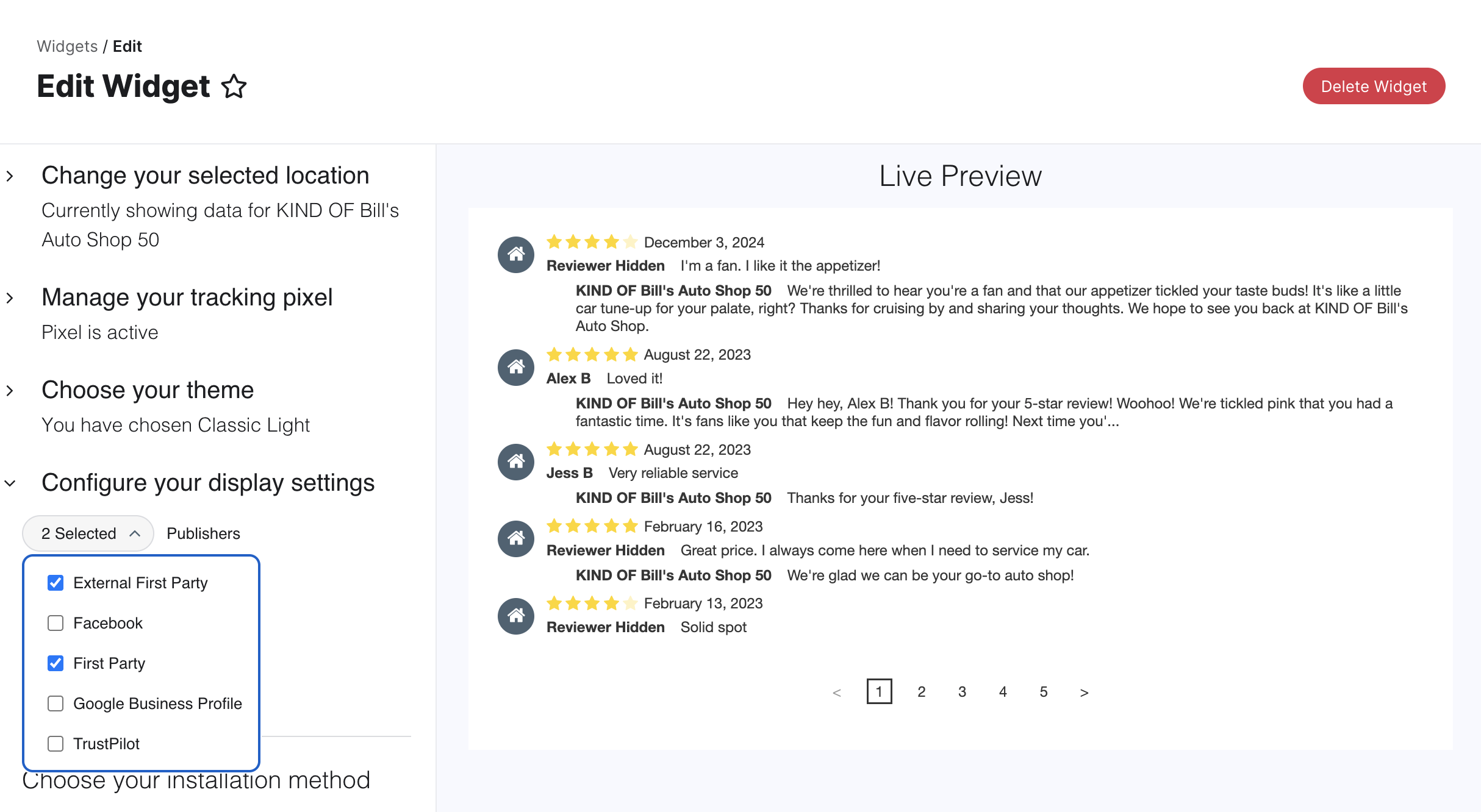
You can now easily include reviews from major third-party platforms directly in your Reviews Widget, giving potential customers a more complete view of your reputation and helping you build trust. The widget now supports integrating reviews from Google Business Profile, Facebook, and TrustPilot.
To set this up, simply navigate to the widget creation flow, and under the "Configure your display settings" toggle, use the new dropdown menu to select any combination of these external publishers alongside the "External First Party" and "First Party" options. Net-new widgets will select all publishers by default. You can also choose whether to display the publisher icons. Refer to the Create a Reviews Widget help article for step-by-step instructions.
Reviews Overview Page Deprecation
As announced in the last release, the Reviews Overview screen will be deprecated on December 10, 2025. For more information, refer to the release note.
Social
API Updates: Post Title and Delete Post
We have updated the Management API to allow users to create post titles and delete posts for Social.
To set a post title, use the postTitle field in your requests. You can view this title in the response of the create post (Post: Create), list posts (Posts: List), and get post (Post: Get) endpoints. The post title is internal only and allows users to identify and track the performance of social posts.
To delete a post, use the delete post (Post: Delete) endpoint. The post must be scheduled but not yet published in order to delete it. Deleting posts is only available for Instagram.
Pages
Staging Environment for Pages for Marketers
You can now use a dedicated Staging Environment to build, test, and quality check changes to your Pages site configuration and design without impacting the live production site.
While changes to the layout of pages can be previewed without publishing to the live page, there was no way to save and persist configuration changes (such as launching a new Page Group) without immediately publishing them to the production site. The Staging Environment provides a secure, controlled space for your team to QA and approve all updates before they reach your customers. This is vital for complex launches, like new intent pages, where you need to review the final look and feel before going live.
The Staging Environment allows you to make and review the following changes on a staging domain:
- Add New Page Groups: Launch directories, locators, and additional page types like intent pages.
- Modify Existing Page Groups: Update settings for an existing group, including locales, saved filters, and URL templates.
- Update or Revert the Version of the Site: Test a new version of the underlying site components.
- Modify the layouts for page groups.
- Modify the global site styling.
Setup and Workflow
- Create Staging: The first time you use it, go to Pages > [Your Site] > Site Configuration and click Create Staging Environment.
- Work and Toggle: Once created, use the button at the top of the screen to toggle between the Production and Staging Environments to make and review your changes.
- Publish: When your changes are fully QA'd, navigate back to the Site Configuration screen and click Publish to Production.
- Note: This action will completely replace your existing site at the production domain with the Staging Environment content and cannot be undone.
Visual Editor Improvements
We've rolled out a series of enhancements that significantly improve site customization and component management. Update your library to access these improvements today. Learn how in the Get Started with Pages for Marketers guide.
Enhanced Locator Component Functionality
- Add Facets to Locator Component: You can now configure dynamic facets, a common feature for search experiences that allows users to refine results after an initial query. Add facets for fields such as city or services, and toggle built-in facets on and off for Distance (e.g.,
< 5 miles) and Open Now. - Customize Locator Cards: Gain full control over the information displayed in the results card. Easily show/hide elements like the primary and secondary CTAs (and customize their labels/links), address, phone number, hours, email, services, and images (for example, headshots).
- Specify Map Starting Location: You can now precisely define the initial center point of your Locator map using latitude and longitude coordinates.
Improved Component Usability
- Click-to-Edit Component Elements: Editing components is now faster and more intuitive! Instead of scrolling through a long list of properties for a section in the right-side panel, you can now click directly on parts of a section to instantly pull up the relevant properties for editing.
- Improved Empty State of Sections: We've added clear empty state messages to sections and properties that rely on entity data. If a component is blank in the editor, it will now explain why it's not appearing (e.g., "Section hidden for this entity; Entity’s mapped field is empty"), making troubleshooting much easier.
- Default Values for Images: We’ve added default placeholders for image fields. When an entity lacks a value for a mapped image field, an image icon will be shown.
Platform
Bulk Invalidate Passwords
Within your account, you can invalidate user passwords and force users to reset their passwords in bulk. To use this feature:
- Navigate to the Account Settings > Users screen
- From the table, select the checkbox next to the user(s) you want to force a password reset for
- Click the More Actions button and select the Force Password Reset & Email Users option from the dropdown
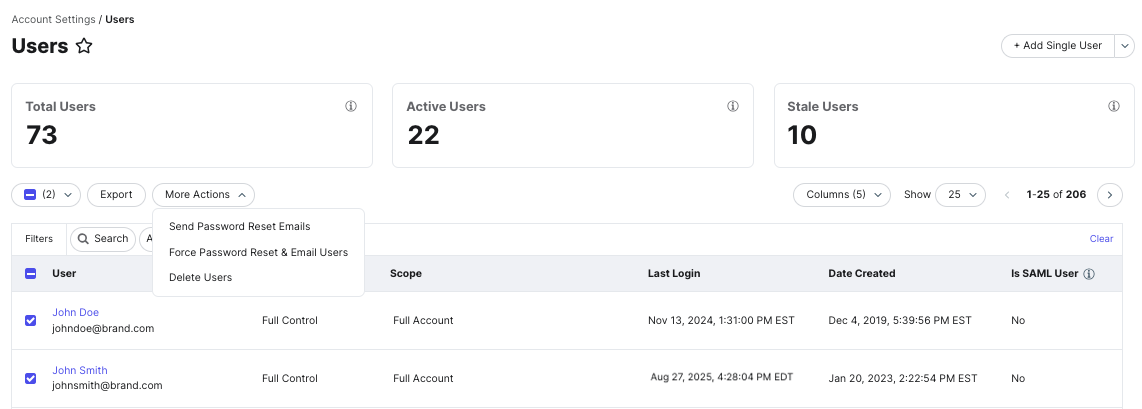
Previously, you had the ability to send a bulk password reset without invalidating the current password, which has been renamed to Send Password Reset Emails within the More Actions dropdown.
See the Reset User Passwords article to learn more.
Updated SSO Allowed Login Types
We are streamlining our SSO configuration by always supporting both SP-initiated and IDP-initiated login types.
Previously, we allowed customers to restrict their allowed login types to either IDP-initiated Only or SP-initiated Only. These options will be deprecated in the February release.
If you do not have the information required for SP-initiated SSO, you will still need to provide the required configuration for the SP-initiated login flow to work. You can provide this information on the Account Settings > SAML Congfiguration screen.
See the Configure SAML SSO guide to learn more.
Tasks Inbox Bulk Actions
In the October ‘25 release, we announced the beta for Bulk Tasks Actions. In this release, we are announcing the general availability of this feature.
To do this, navigate to Inbox > My Tasks and select the checkboxes next to the tasks you want to action on. Actions that can be completed in bulk include:
- Bulk Assignment: Tasks can be assigned to different users. This will override any users that are currently assigned.
- Bulk Close: Tasks will be closed. Any posts, comments, and responses that are closed will not be published.
- Bulk Approval: Task will be approved and published.
Users must be assigned a role with the Manage Tasks permission. To create a role with this permission:
- Navigate to the Account Settings > Roles screen
- Click + Add a New Role or click the Edit button next to an existing role
- Within the role settings, select the Platform tab
- Select the checkbox for the Inbox > Tasks > Manage permission
- Click Save
Note that a user’s scope will also impact which tasks they can action on; therefore, having a scope of Full Account or all entities will allow you to action on all tasks.
Consolidated Email Notifications for Tasks
We have combined email notifications for upcoming or overdue tasks with the Daily Digest. This will reduce the number of emails you will receive about Tasks that are due in less than 48 hours.
Search
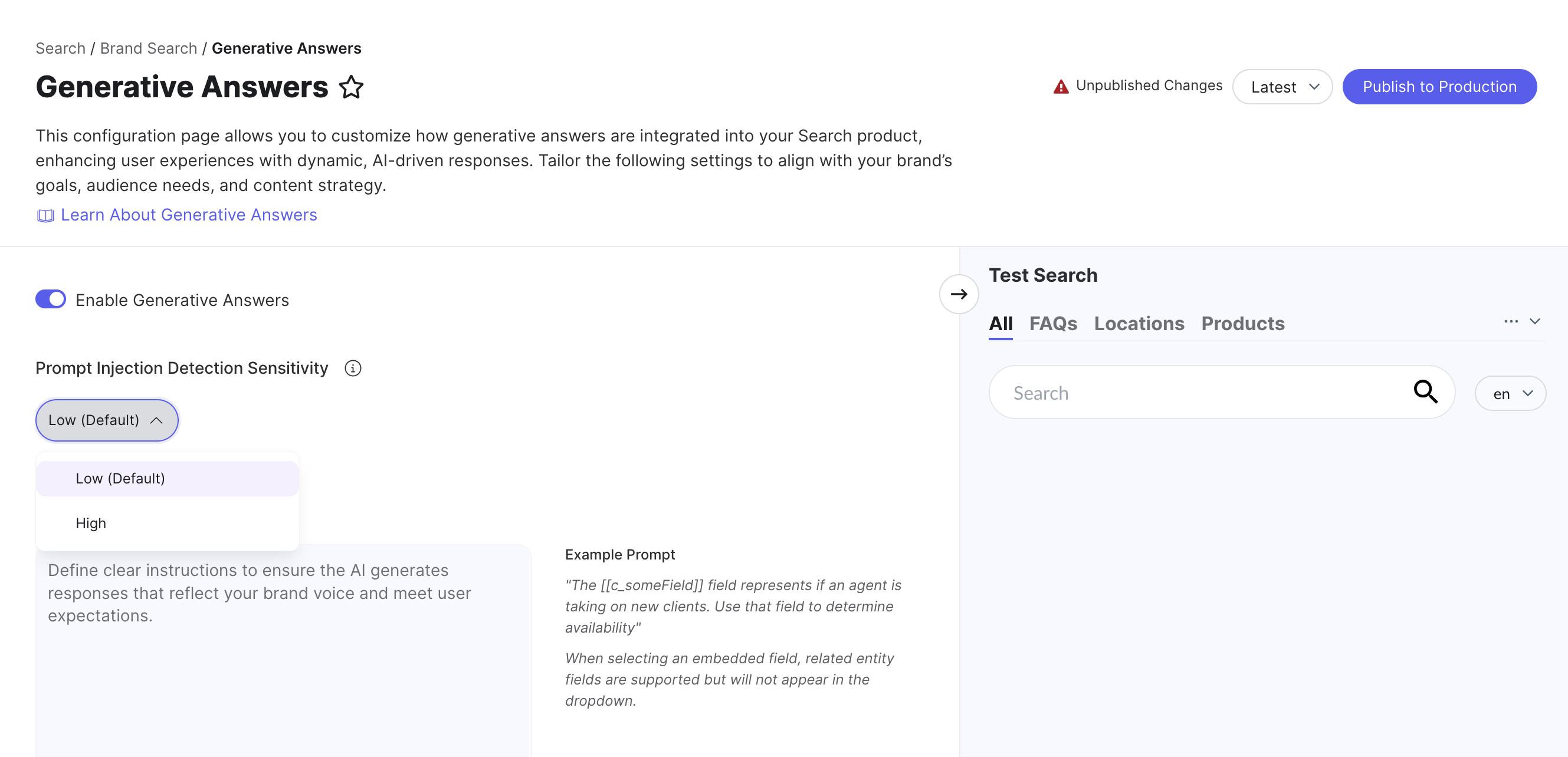
Additional Prompt Injection Detection for Generative Answers
We've introduced a new setting that allows admins to configure an additional level of prompt injection detection for Generative Answers, providing you with greater control over the security and reliability of your search experience.
Admins can adjust the detection level, which defaults to Low, on the Generative Answers tab in Search. The search algorithm automatically applies an internal prompt that aligns with your chosen detection level, effectively restricting the types of questions the model will answer.
When set to High, this advanced detection mechanism helps prevent the model from "hallucinating" or being manipulated by malicious queries.
Note: Higher detection levels will cause Generative Answers to return results less frequently, as more queries will be flagged as potential injection attacks.
Check out the Generative Answers (Backend) unit for more information.