Listings
Bing and Yahoo Removed from Search Tracker
With this release, Bing and Yahoo will no longer be available as publishers in Search Tracker data. Any historical Search Tracker reports containing data from Bing and Yahoo will be preserved.
As a result of Bing and Yahoo being removed, you can expect changes to data within the Listings Insights screen and Search Tracker metrics in Report Builder, as the data will now only reflect performance on Google. For example, the Search Requests metric will appear lower while metrics like Average First Match Position may appear higher or lower.
Search Tracker reporting will reflect Bing and Yahoo data through October 29th, 2025. For more on Search Tracker, see the Competitive Intelligence, Search Tracker, and Listings Insights overview unit.
Announcement: Facebook Analytics Deprecations for Listings
Facebook is deprecating several page and post analytics from their API on November 15, 2025. This will impact both Listings and Social analytics. Also see the Announcement: Facebook Analytics Deprecations for Social to see how Social analytics will be impacted.
As a result of this update, we will be updating any Yext metrics and dimensions that utilize these deprecated metrics on November 10th.
Updated Metrics
We have made changes to the following analytics. Any new calculations will be reflected in the data for any dates after November 5. You can expect to see a difference between data fetched before and after the transition due to the change in how these analytics are calculated.
- Facebook Page Impressions
- We have updated the calulation.
If you are using this in reports, they will automatically be updated.
New Metrics
We have added the following metrics:
- Facebook Page Followers by City
- Alternative metric for Facebook Page Likes by City
- Facebook Page Followers by Country
- Alternative metric for Facebook Page Likes by City
Deprecated Metrics
We have deprecated the following analytics. Data will no longer be pulled for these, but historical data will still be available for dates through November 5.
- Facebook Page New Likes
- Facebook Page Fans by Locale
- Facebook Page Unlikes
- Facebook Page Reach
- Facebook Likes
- We offer the Facebook Page Total Followers metric as an alternative
- Facebook Page Fans by City
- We offer Facebook Page Likes by City as an alternative.
- Facebook Page Fans by Country
- We offer Facebook Page Likes by Country as an alternative.
If you are using these metrics and dimensions in your reports and no longer want to include them, you will need to remove them manually.
See the following documentation to learn more:
Publishers
UTM Parameters Accepted for Apple Action Links
UTM parameters can be added to URLs within the Apple Action Link field. Previously, any UTM parameters were stripped from URLs before being delivered to Apple due to publisher restrictions. Those UTM parameters will now be sent to Apple.
Improvements to the Yelp Search API
We have made improvements to the Yelp Search API to improve duplicate identification. This will reduce the creation of duplicate Yelp listings.
Reviews & User-Generated Content
Improved SMS Invite Capacity Tracking
Reviews SMS invite capacity tracking has moved from the Review Generation Settings screen to the Platform Usage screen. This shift provides a significantly improved UI for tracking your current capacity, monitoring usage, and managing your message volume, allowing you to quickly determine if an upgrade is needed.
To view the SMS capacity usage:
- Navigate to Account Settings
- Click on Platform Usage. Here you’ll see a row for SMS Capacity that displays the usage and capacity for the current period.
- Click View History to view usage from previous periods, where you can also view and export timestamped usage for each period.
Note: Your monthly usage periods align with your organization’s billing cycle, not calendar months.
Announcement: Google Q&A Discontinuation
On November 3, 2025, Google is discontinuing its Q&A API endpoint. At that point, Yext can no longer post or respond to Google Q&As. Once this feature is discontinued, we will transition the Q&A page in Yext to a read-only state.
You can access and review your existing data and reporting details through the API until it's discontinued. We recommend you update your workflows to stop using the My Business Q&A API and export or repurpose your Q&A content before November 3. Export functionality will exist even when the page is read-only.
For more information, check out our blog post.
Announcement: Reviews Overview Page Deprecation
The Reviews Overview screen will be deprecated on December 10, 2025. All of the content on this screen is duplicative of analytics that can be found on other Reviews screens or Report Builder.
The following list details where each metric on the Reviews Overview screen can be found moving forward (you may have to update the time range):
- Reviews this Month
- Reviews Insights screen: Reviews Volume
- Report Builder: Reviews metric
- Review Monitoring screen: Total Reviews
- Average Rating this Month
- Reviews Insights screen: Average Rating
- Report Builder: Average Rating metric
- Review Monitoring screen: Average Rating
- Generation Rate this Month
- Reviews Generation > View Invites screen: Success Rate
- Recent Reviews
- Reviews Monitoring screen: Full stream of incoming reviews
- Reviews Insights screen: Review Summaries to get summaries of reviews
- First Party Reviews this Month — # Reviews Generated
- Review Monitoring screen: Total Reviews with filter “Site = First Party”
- Report Builder: Reviews metric with filter “Site (Reviews) = First Party”
- First Party Reviews this Month — Average Rating
- Review Monitoring screen: Average Rating with filter “Site = First Party”
- Report Builder: Average Rating metric with filter “Site (Reviews) = First Party”
- Your entities compared to similar businesses nearby (Competitive Intelligence package needed)
- Report Builder: Compare your brand’s metrics (Reviews and Average Rating) with your competitor’s metrics (Rolling Review Volume and Rolling Average Rating). Dimension by entity to compare each location’s metrics to the competitor’s.
- Competitors’ Average Rating (Competitive Intelligence package needed)
- Report Builder: Rolling Average Rating metric with dimension Sites (Reviews).
Refer to the Reviews Overview Screen reference document for more information on viewing these metrics moving forward.
AI Review Generation Template Editing
You can now create and edit Review Generation templates using AI, enabling users to modify or rewrite templates directly without requiring developer tools or support for what was previously a technical process. This simplifies template management, enabling faster, no-code customization of tone, style, and messaging.
To use AI-powered editing for Review Generation templates, navigate to your Review Generation template and click Edit with AI. Type in your instructions, select the templates to apply the instructions to, and click Apply Edits, which generates the changes for you. Continue using this feature to further iterate on the template. A technical user can still go in to Edit the template and see the code written by AI.
To learn more, check out the Review Generation Templates unit.
Review Insights Summary Notification
A new Review Insights Summary notification will now alert users when their weekly or monthly Review Insights summary is available. This ensures users are promptly informed when new insights are ready for review, allowing for timely analysis and action to proactively manage your brand’s reputation. Both in-platform notifications and emails are sent to users with the Manage Insights permission. This can be toggled off from the Notifications screen.
Social
New Social Permissions Section
Social permissions have been moved to a separate section when creating or updating user roles within Account Settings (Account Settings > Roles). Social post permissions used to live under the Listings tab, but now you can find them in the new Social tab.
We have also added the following new permissions:
-
Page Access
- Post Feed
- View
- Comments & DMs
- View
- Post Calendar
- View
- Post Feed
-
AI
- Post Caption
- Generate/Transform
- Comments & DMs Response
- Generate/Transform
- Post Caption
See the Approval Permissions documentation to learn more.
LinkedIn Analytics
We have added new post-level metrics for LinkedIn that can be reviewed in Report Builder and the API.
We have updated our three existing total count (cumulative) Social metrics to include LinkedIn data:
- Post Likes / Reactions (Cumulative): The cumulative like count for the same post across Facebook, Instagram, and LinkedIn.
- Post Shares (Cumulative): The cumulative number of shares for the same post across Facebook, Instagram, and LinkedIn.
- Total Post Reach (Cumulative): The cumulative reach for the same post across Facebook, Instagram, and LinkedIn.
We have also added two new LinkedIn-specific metrics:
- LinkedIn Post Engagement Rate: The total engagement rate of your LinkedIn post.
- LinkedIn Post Comments: The total number of comments on your LinkedIn post.
See the Social Metrics and Dimensions documentation to learn more.
This feature is available as part of Yext Social.
Announcement: Facebook Analytics Deprecations for Social
Facebook announced that they are deprecating several page and post analytics from their API on November 15, 2025. This will impact both Listings and Social analytics. Also see the Announcement: Facebook Analytics Deprecations for Listings to see how Listings analytics will be impacted.
As a result, we will be updating any Yext metrics and dimensions that utilize these Facebook deprecated metrics on November 10th.
Updated Metrics
We have updated our calculations for the following analytics. These calculations will be reflected in the data for any dates after November 5. You can expect to see a difference between data fetched before and after the transition due to the change in how these analytics are calculated.
- Facebook Post Total Impressions
- Facebook Post Impressions Paid
- Facebook Post Impressions Organic
- Post Impression Type
- The Viral type is no longer available as a dimension or filter. Post Impression Type will only support the Paid and Organic post impression types.
If you are using any of these in reports, they will automatically be updated.
Deprecated Metrics
We have deprecated the following analytics. Data will no longer be pulled for these, but historical data will still be available for dates through November 5.
- Facebook Post Total Reach
- Facebook Post Paid Reach
- Facebook Post Organic Reach
- Facebook Page Post Impressions
- The following dimensions for this metric will also be deprecated:
- Facebook Page Post Impressions (Paid)
- Facebook Page Post Impressions (Organic)
- Facebook Page Post Impressions (Viral)
- The following dimensions for this metric will also be deprecated:
If you are using these metrics and dimensions in your reports and no longer want to include them, you will need to remove them manually.
See the following documentation to learn more:
Pages
View Crawler Activity in Report Builder
We've introduced a new metric and dimension to Pages Analytics that gives you better visibility into how your pages are being served and crawled. Access these in Report Builder.
The new metric Page Serving Requests accurately tracks the total number of times a page has been served. It is a significant upgrade from the existing Page Views metric because it captures data directly from the serving layer (Cloudflare), meaning:
- It no longer requires a client-side opt-in.
- It captures requests that the previous client-side metric missed, providing a more complete picture of your traffic.
The new dimension Bot Category shows the category of bot crawling your pages (e.g., search engine bot, AI agents). This data is pulled from the serving layer, allowing you to monitor and analyze activity from various bots hitting your pages. Refer to Cloudflare documentation for a comprehensive list of categories.
With these new additions, you can build powerful reports, such as:
- Track Volume Over Time: Dimension Page Serving Request by Day and Site to track the total number of requests served over time for each site in your account.
- Note: This includes all assets, such as JavaScript and CSS, not just the main HTML page.
- Bot Crawling Analysis: Dimension Page Serving Request by Bot Category and Day to see how frequently specific agents (like AI crawlers) are accessing your site.
Custom URL Templating for Page Groups
We've enhanced the page group creation flow to give you more control over your site's structure, allowing you to set a custom URL template for each Page Group. This update is a foundational step that unlocks the ability to create intent pages without code, allowing you to start capitalizing on specific long-tail search intent with AI-optimized pages.
- No More Path Conflicts: You are no longer restricted from creating a second page group tied to the same location entities.
- Custom URL Structures: By setting a custom template, you can now build pages that capture specific, high-intent searches (e.g., product or service-specific searches like "iced latte near me") and tie them directly to your locations.
Previously, you were limited to the single, default URL structure [[address.region]]/[[address.city]]/[[address.line1]], which would give you a location page URL like www.brand.com/ny/new-york/3720-main-st. You can now create a core location page and a separate "Iced Latte" page for the same location by setting the custom URL template to, for example, [[address.region]]/[[address.city]]/[[address.line1]]/iced-latte.
For more information, see the Get Started with Pages for Marketers guide.
CSV Upload for URL Redirects
We've enabled the ability to upload a CSV file to add URL redirects to your Pages site, making it easier and faster to manage your site’s redirects.
To upload a CSV for redirects:
- Navigate to Pages > [Your Pages Site] > Site Configuration.
- Click on the URL Redirects setting.
- If no file is currently uploaded, you can download a template to see the required format. Otherwise, simply upload your CSV file.
Notes:
- You can only have one CSV redirects file uploaded at a time. To add new redirects, download the existing file, append your new redirects, and upload the updated file. This helps keep your redirects clean and prevent redundancy.
- Whenever you save a new redirects CSV, the site will automatically trigger a new deploy.
Visual Editor Improvements
We've rolled out a series of enhancements, which are available now. Update your library to access these improvements today. Learn how in the Get Started with Pages for Marketers guide.
- Embed Knowledge Graph fields in Custom Code. Significantly expand the power of the Custom Code section by using Handlebars templating in your HTML. You can now dynamically drop in Knowledge Graph field values (e.g., entity name or city) and even use complex logic like looping through list fields.
- User-Editable Schema: Gain more control over your page’s technical SEO by editing the generated page schema in Advanced Settings. You can toggle between the schema template and a preview populated with values for a specific entity. Use the field picker to easily embed Knowledge Graph fields, and then test the schema with the Google Rich Results Test.
- Map Starting Location Option in Locator: Easily define the initial focus point for the map on your Locator pages.
- Banner Section for Directory and Locator Pages: The Banner section is now available to use on both Directory and Locator page types.
- Bug fixes and other minor enhancements
Knowledge Graph (formerly known as Content)
Knowledge Assistant Deprecation
On October 29, 2025, Knowledge Assistant functionality will be deprecated and all mentions of Knowledge Assistant will be removed from the platform. Users will no longer be able to interact with the feature via text message or Facebook Messenger.
To manage your brand while on the go from your mobile device, we recommend using the new Yext Mobile App.
Platform
Yext Mobile App
In the September ‘25 Release, we announced the beta for the Yext mobile app. With this release, we are announcing the general availability of the Yext mobile app.
You will be able to manage your brand while on the go through actions like:
- Responding to reviews using assets and AI tools to create responses quickly
- Receiving push notifications so you never miss a new review or your latest Scout data
- Reviewing Scout metrics and insights to understand how your brand is doing
- Updating your Knowledge Graph information, including hours and description
The Yext mobile app is available in the App Store and Google Play Store starting in early November. Note that the Hearsay app is also available as Hearsay Mobile by Yext.
Review the following to learn more:
Add Users to User Group Based on Roles
You can add users to user groups based on the roles they have been assigned. This feature will make it easier to manage large user bases and enable more flexible workflow rules that target groups by role.
Navigate to Account Settings > User Groups. Once you select or add a new user group, you can utilize this feature within the Users in Group field. Within this field, select + Add Users to open the user picker. This picker allows you to select individual users as well as roles. When you select a role, all users currently assigned to that role will be added to the user group.
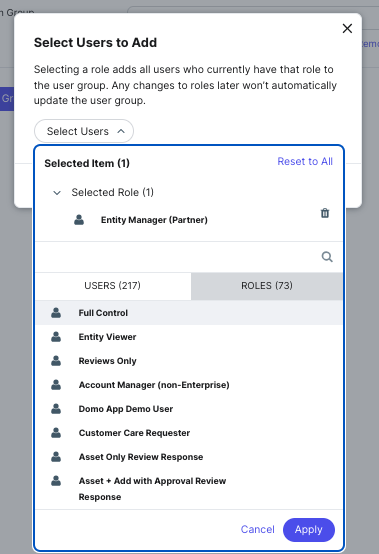
For example, if you select the Account Manager role to be added to a custom “Brand Approvers” User Group, then every user with the Account Manager role assigned to them will be a part of that group.
Note that if roles change for these users at any point after being added to the user group, they will remain in the user group. If they should be removed, you will need to update the user group.
See the User Groups documentation to learn more.
Bulk Task Actions (Beta)
During this beta, users with the Manage All Tasks permission (on the entity or account level) will be able to action on tasks within the Inbox in bulk. Actions that can be completed in bulk include:
- Bulk Assignment: Tasks can be assigned to different users. This will override any users that are currently assigned.
- Bulk Close: Tasks will be closed. Any posts, comments, and responses that are closed will not be published.
- Bulk Approval: Task will be approved and published.
Reach out to your account team to learn more.
Search
Announcement: Q&A Component Discontinuation
Due to the discontinuation of the Google Q&A API (see the release note in the Reviews section), Yext is deprecating the entire Q&A product, including first-party Q&A functionality available through the Search Hitchhikers Theme.
Starting November 3, 2025, new questions submitted through this Search component will not be pulled into the Yext platform, and questions previously pulled in cannot be answered within the platform.
If your Search experience is built on the Hitchhikers Theme and utilizes the Q&A component, we strongly recommend you remove it from all search results pages where it is used. To do so:
- Navigate to your Search experience.
- Open the relevant Handlebars files (
pages > [pageName].html.hbs). - Remove both the
qasubmissionmarkup and corresponding script lines. - Repeat for every page that uses the Q&A component.
Customers currently using the Q&A component will receive an email from their account team with more detailed information.
For further guidance, see the Theme Question and Answer unit.