Listings
External Account Issue Notifications
You can now configure proactive notifications for external account issues affecting Google Business Profile and Facebook integrations. These notifications alert when a linked publisher account becomes disconnected or invalid, so you can quickly reconnect and restore synchronization before larger Listings or Social publishing disruptions occur.
To set up these notifications, navigate to Account Settings > Notifications and add a custom notification, selecting Listings as the product area and Linked Accounts Issues as the notification type.
See the Create Listings Notifications documentation to learn more.
Listings Accuracy Details API
Customers can now retrieve the underlying field-level values used in Listings Accuracy calculations via a new API endpoint. Alongside existing accuracy metrics, the endpoint returns both the Yext entity value and the corresponding publisher value for supported fields, making it easier to identify exactly which values differ between Yext and publisher listings and take action programmatically.
Additional Listings Statuses added to Snowflake Data Share
Customers using Snowflake Data Sharing can now access additional Listings status fields within the shared dataset.
This enhancement makes it easier to retrieve Listings performance and status information at scale without relying on account-level data pulls through the Partner Portal.
Publishers
Increase Google Menu Photo Limit
The Google Menu photo limit has increased from 80 photos to 200 photos.
Add Support for XING URL for Cylex
Xing URL links, which are available in Knowledge Graph for entities in Germany, Austria, and Switzerland, are now syncing to Cylex.
Hidden Address Support Available for Zillow
We have added hidden-address support for Zillow listings similar to existing Facebook behavior. When the Hide Address in Listing flag is enabled, Yext will export “Area Served” in place of the street address fields while continuing to export the city and state normally. This will prevent the actual address from being sent to Zillow.
Deprecation of Bing from Reseller Listing Scans
Bing will be removed from reseller listing scans due to the ongoing unavailability of Bing’s Search API, which has been causing scan failures and inaccurate results. This change will prevent failed Bing scans from appearing to resellers until reliable API access is restored.
Publisher Deprecation: City Search
City Search has been removed from the Yext Publisher Network. We will no longer be syncing data to this publisher.
Publisher Deprecation: Insider Pages
Insider Pages has been removed from the Yext Publisher Network. We will no longer be syncing data to this publisher.
Reviews & User-Generated Content
Healthcare-Optimized SFTP Review Generation
Healthcare customers can now use SFTP Review Generation to better control their reputation programs and get patient feedback that more accurately reflects how care is delivered. This feature allows organizations to balance review generation volume across both Healthcare Professional and Healthcare Facility entities from a single patient interaction record. When a customer sends a file containing at least one provider identifier (such as NPI) and one facility identifier (such as location ID), the system does the following:
- Looks for a match for the Healthcare Professional entity.
- Looks for a match for the Healthcare Facility entity.
- If both entities are found, routes the review invitation according to a customer-defined split (e.g., 50/50, 70/30).
- If only one entity is found, routes only to the matched entity.
- If neither is found, the system rejects the file and generates an error.
Admins can enable the healthcare routing mode within the SFTP Review Generation setup. During configuration, map the provider identifier field and the facility identifier field, and then set the desired routing split percentages for both Provider and Facility.
Review Monitoring and Exports Enhancements
We have made the following improvements to the review monitoring and exporting experience:
- Customers can now add an Entity Labels column to the Monitoring table and filter by entity labels when exporting reviews. To add the new column to your Monitoring table, click on the column picker (gear icon), and select Entity Label.
- The Generated column now uses human-readable values (true/false instead of 1/0), eliminating the need for manual data cleanup after exporting.
Review Content added as a Dimension in Report Builder
Review Content has been added as a dimension in Report Builder, allowing users to see qualitative verbatim feedback alongside quantitative metrics in review-related reports, dashboards, and exports. Previously, users could only track review volume and sentiment within Report Builder. This forced admins to spend time and resources manually extracting and pairing verbatim review content for executive reporting.
Automatically Deliver Saved Review Exports via Email
Users can now schedule Review Exports to be delivered automatically via email, allowing customers to distribute review data to specific regions, locations, or stakeholders who might not have access to SFTP.
To set up a new automated email, do the following:
- On the Reviews Monitoring page, apply the desired filters for the reviews you wish to export.
- Click Create Saved Export.
- Select Email as the export type.
- Enter the recipient email addresses, subject line, and your preferred delivery frequency.
- Save the export.
You can manage or edit export schedules by navigating to Reviews > Configuration > Saved Review Exports.
See the Export and Share Reviews documentation to learn more.
Review Workflows API
The new Review Workflows API allows Resellers to automate their review management at scale by integrating the Yext automation engine with their own internal systems, dashboards, and third-party support tools. This API reduces manual overhead and ensures that reviews are addressed according to brand standards without requiring users to log into the Yext platform.
Developers can use the API to:
- List Workflows: Retrieve a list of all active and inactive review workflows within an account.
- Manage Configurations: Create or update the rules that trigger actions, such as "If a review is 1-star and contains the word 'broken', then respond with this asset"
- Trigger Actions: Programmatically execute workflow actions on specific reviews.
The Review Workflows API is available to all accounts with a Review Response subscription and is accessible using existing API keys. Documentation for the new endpoints can be found in the Yext Developer Portal, under the Reviews API section.
Pages
Custom Images for Locator Map Pins
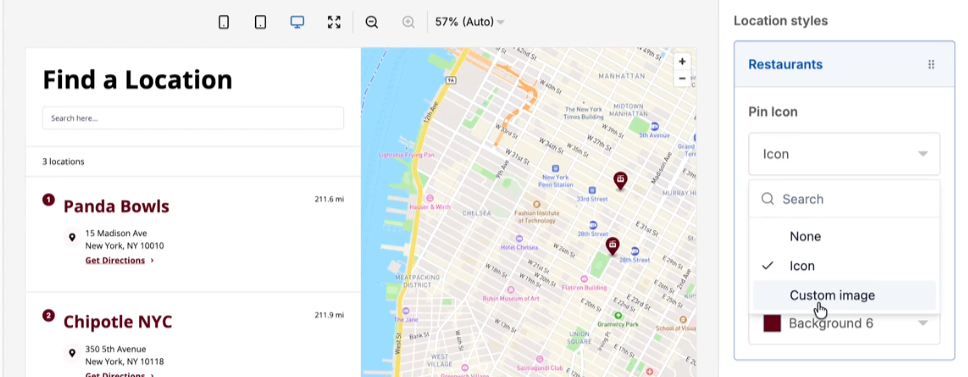
Customers can now upload custom images to use as map pins in locator views, replacing standard markers with branded icons that better represent location types. For example, a bank could use a mini ATM icon, or a park service could use a fork and knife icon for picnic sites.
To set this up, select Custom Image when configuring your locator map pins.
See the Build a Locator documentation to learn more.
Pages for Marketers 404 Pages
The no-code Pages platform now supports custom 404 pages, bringing it to parity with PagesJS. You can configure a universal redirect URL for missing pages in site settings, or create a dedicated 404 page by setting up a custom 404 entity with a page-not-found page group.
See the Create 404 Pages documentation to learn more.
Linked Entities in Pages for Marketers
The Pages platform now supports linked entity traversal, allowing users to display data from related Knowledge Graph entities directly on a page without restructuring their data. When configuring a page group, field mapping now surfaces fields from linked entities alongside primary entity fields.
This initial release supports only one level of linked entity relationships, covering common use cases like displaying menu items for a location or providers for a facility.
See the Edit Layouts documentation to learn more.
Connectors
Preserve Existing Values
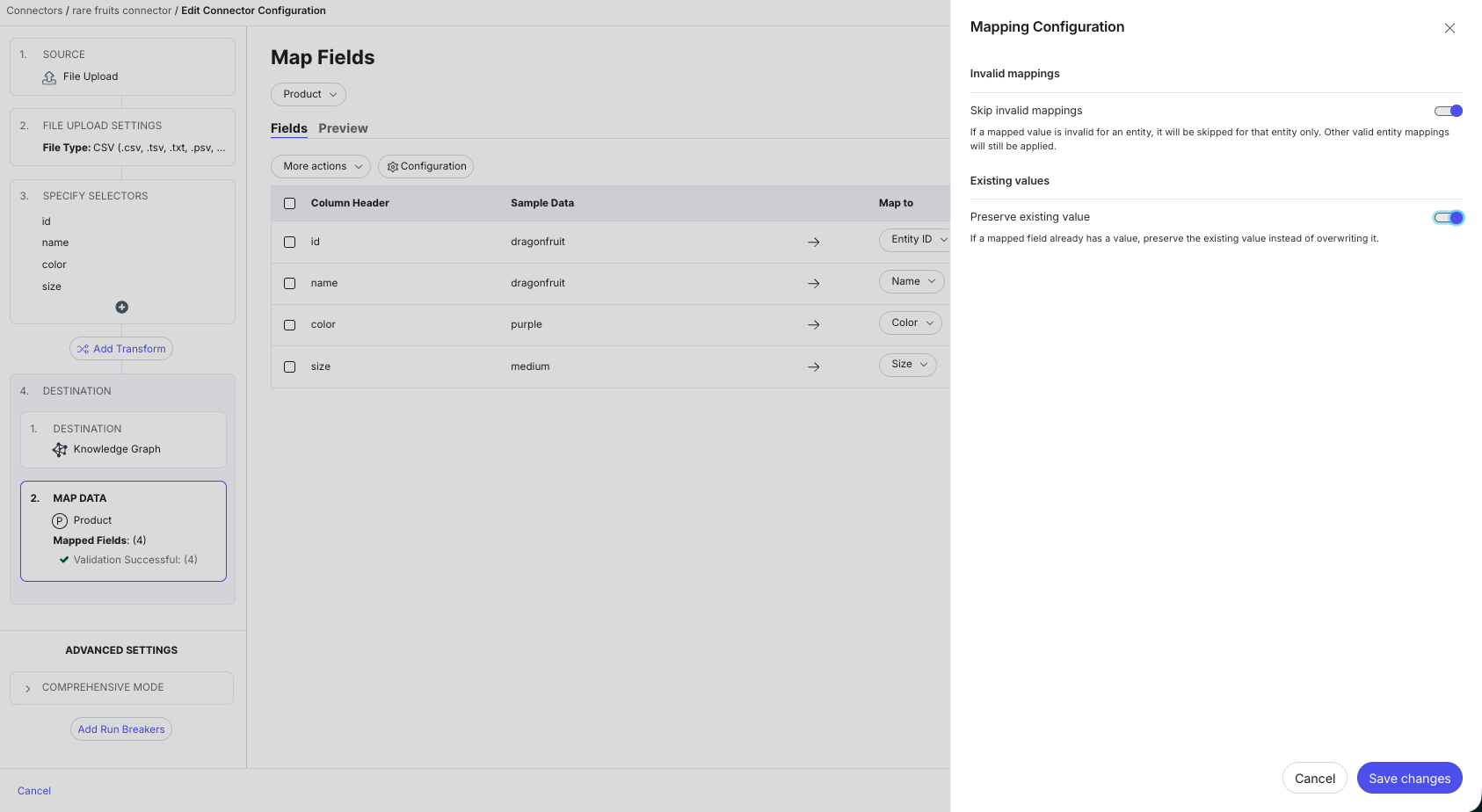
Connectors now support a "preserve existing values" setting, which prevents existing field values from being overwritten during Connector runs. This provides greater control over data management, especially when certain fields are manually curated or should not be updated by automated imports once they have been populated.
To enable this, open the connector's Map Data section, click the Configuration button, and toggle the Preserve Existing Value setting on.
See the Connectors Overview documentation to learn more.
Allow Google Enrichment without CID
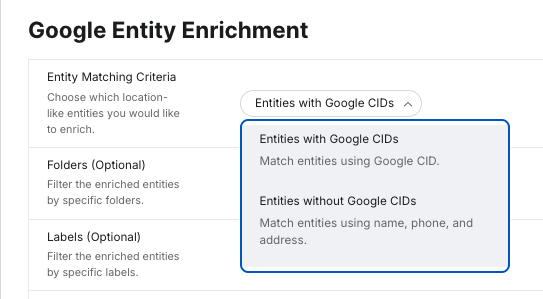
The Google Enrichment connector no longer requires a CID to run. When a CID is not present, the connector will match entities using name, phone, and address data instead, making it easier to enrich listings without managing Google-specific identifiers upfront.
See the Google See the Google Entity Enrichment Connector documentation to learn more.
Platform
Yext MCP Server
Yext now offers an MCP (Model Context Protocol) server, giving you a new way to access and work with your Yext data directly from AI tools without requiring custom code.
The MCP server supports the Knowledge Graph, Reviews, and Scout (scans and metrics). You must have a subscription to a given product to use MCP functionality for that product.
With the Yext MCP server, you can retrieve and visualize data, make updates, and create entities using natural language prompts in AI tools you already use. This is a new interface for Yext that works alongside your existing web, mobile, and API integrations.
Here are a few examples of what you can do:
- Are there any reviews that need a response?
- Update the Main Street location to be open an hour longer today.
- Do all of my providers have phone numbers?
- Analyze win rate, rank, and trend direction across markets and locations.
For a full overview and setup instructions, see the Yext MCP Overview.
Navigation Bridge Enhancements
Yext and Hearsay platform users now benefit from a unified cross-platform experience. Yext Accounts are linked to Hearsay Organizations, and users are matched across both systems, enabling shared login sessions and instant platform switching from the navigation bar.
Overall, the new behavior is more reliable as logging in and out consistently adds or removes access across both platforms, and an active session in either platform allows seamless navigation to the other without re-authenticating
To enable this feature, reach out to Yext Support.
End of support for V1 API
Support for V1 API endpoints has been fully discontinued. Calls to V1 endpoints will now return an error, and any integrations still relying on them must be updated to use the equivalent V2 endpoints. Review the Reseller API Deprecation documentation and the Migrating from v1 to v2 documentation to learn more about updating your code to use V2 endpoints.
AI Signposting
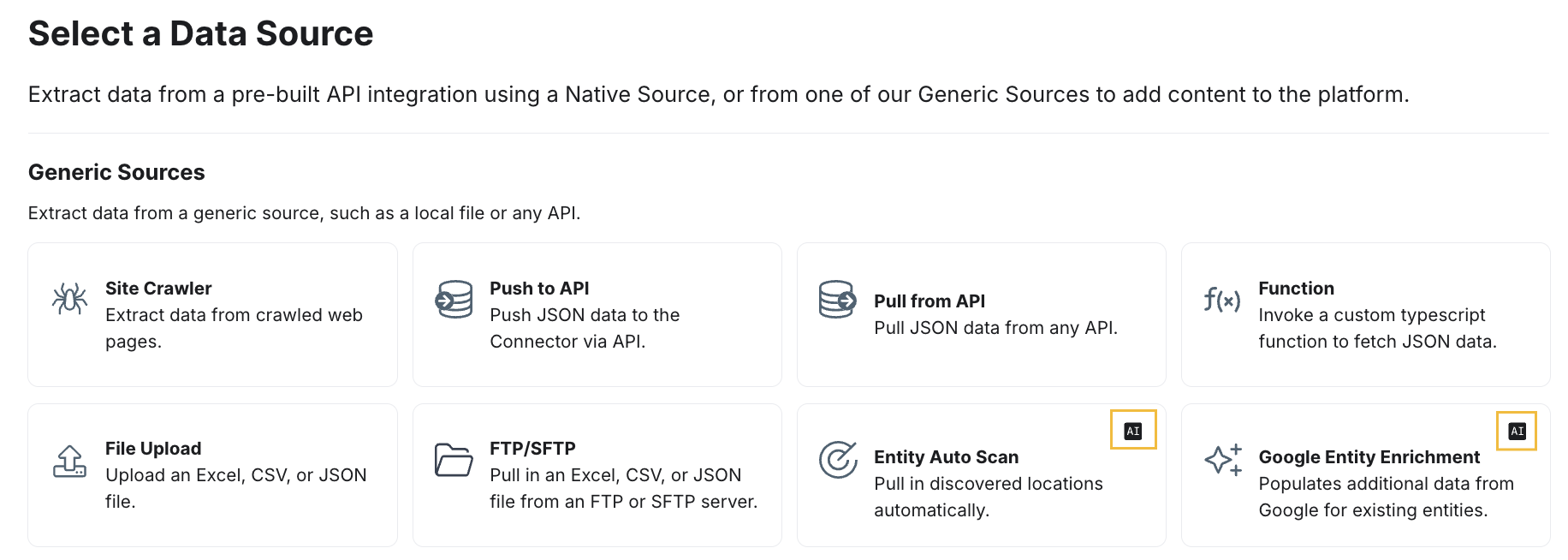
Yext is rolling out a standardized AI signposting system across the platform. This gives you clear, consistent visibility into when AI is at work. It's designed to keep Yext aligned with global regulations, including the EU AI Act, without adding complexity to your workflow.
AI signposting is being added across the platform on a rolling basis. You'll start seeing indicators in AI-powered areas. These will appear as "Powered by AI" labels and AI icons to help you quickly understand where AI is infused in the product.
Search
Show Facet Filter in Search Logs
Search logs now display the static and facet filters applied to each search query, giving you better visibility into user search behavior.
When reviewing a query in the search logs, applied filters are displayed automatically.
See the Search Log Details documentation to learn more.