Publishers
New Deliverect App
Restaurants using Deliverect can now connect their Yext account directly from the App Directory. Once authorized, Deliverect pushes location data (e.g., hours, address, and menu information) into Yext automatically, keeping listings accurate across delivery channels without manual updates.
You can find the app by navigating to the Apps > Integrations screen. Then select Deliverect and click Install.
Brand Link Priority on Apple Maps
When a consumer taps an action button like Book on Apple Maps, your brand's own link now shows first, ahead of third-party sites like Tripadvisor and Booking.com.
Reviews & User-Generated Content
Review Journey Intelligence
Journey Intelligence adds an optimization layer to Reviews by helping businesses discover where in the customer experience things need improvement and prioritize what to fix first. Journey Intelligence splits reviews into segments that represent the stages in the customer journey. Each segment is then tagged with one or more operational topics and their customer sentiment. Impact scores help determine how to prioritize improvements for each stage or topic, and trends show if customer sentiment has been changing for a specific part of the journey. Journey Intelligence includes six tailored industries: Healthcare, Food & Dining, Hotels & Lodging, Shopping, Automotive, Financial Services. A more general customer journey is available for entities that don’t fit within one of the industries.
Example Retail Journey
Need Recognition → Discovery & Consideration → Access & Entry → Product Search & Evaluation → Purchase & Fulfillment → Post-Purchase Relationship
Topics for Purchase & Fulfillment might include Shipping & Delivery, Customer Service, and Wait Times.
Go to Reviews > Journey Intelligence to get started.
Collect Category Ratings with Review Generation
Review Generation now lets businesses ask reviewers to rate specific categories that matter to them, such as Cleanliness, Staff & Team or Speed & Wait Times. The result is structured, comparable feedback on each part of the experience that gives businesses more well-defined focus areas.
When a customer leaves a review, they can optionally select individual categories to rate from 1-5 stars alongside their overall review. Category ratings are saved with the review and appear on the Review Monitoring page in a new section of the Review Detail modal (first-party reviews only). Admins can configure which categories appear in their Review Generation Settings.
Rolling Average Rating and Rating Lift Metrics in Report Builder
Rolling Average Rating and Rating Lift are now available in Report Builder, allowing businesses to quickly see how an entity's cumulative rating changed over that period. Previously, these metrics had to be calculated manually.
Rolling Average Rating - The average of the customer's rated reviews from the start of the selected date range through the end of each time bucket.
Rating Lift - Ending rolling average rating minus starting rolling average rating for the selected date range.
Syndicate First-Party Reviews to Healthgrades via API
Healthgrades syndication lets healthcare organizations push their first-party reviews from Yext to provider profiles on Healthgrades. But the in-platform bulk action handles at most 100 reviews per batch, which doesn’t work for larger healthcare organizations. With the new Review: Syndicate API endpoint, organizations can automate syndication from their own systems to work through large historical backlogs and keep Healthgrades in step as new reviews arrive, without manual work in the platform or going to Healthgrades directly.
To syndicate, call the Syndicate endpoint for each first-party review. The optional body field publisherId defaults to Healthgrades, currently the only supported publisher.
Note: A review can be syndicated only once. If the review is edited in Yext afterwards, the changes are not sent to Healthgrades.
Apartments.com Integration for Reviews
Apartments.com is a major rental listing site where resident reviews can shape where renters choose to live. With this integration, reviews left on Apartments.com now flow into Yext Reviews, allowing teams to monitor them, get notified, include them in workflows, and respond from the same place as their Google, Facebook, and other reviews.
This integration is only available to an initial set of mutual customers. For more information, contact your Customer Success Manager.
[Announcement] Q&A Page is Being Deprecated
The Q&A page is being removed from Reviews in the December release. The page has not been updated since Google shut down its Q&A API in November 2025. Google has replaced Q&A on Business Profiles with AI-generated answers powered by Gemini, which Yext Scout now tracks as an AI source.
If you want to keep your Q&A data, export it before the December 2026 release:
- Go to Reviews > Q&A.
- Use the filters to select the questions you want to export.
- Click More Actions, then select Export.
If you don't need the data, no action is required.
Social
Social Overview Page
Social now opens on an Overview page that tells social and marketing teams, at a glance, whether their brand is present across all locations, whether that presence is working, and what needs their attention. The Overview page includes:
- Key metrics: Presence coverage, posts published, impressions, and engagements, each with a trend compared to the previous period
- Recommended Actions: High-priority Social items from Action Center, grouped by impact, that can be reviewed, published, or rejected directly from the Overview screen, or explored in full via Action Center
As part of this update, the post publisher’s preview dropdown now only shows eligible location and network combinations.
Social Post Library
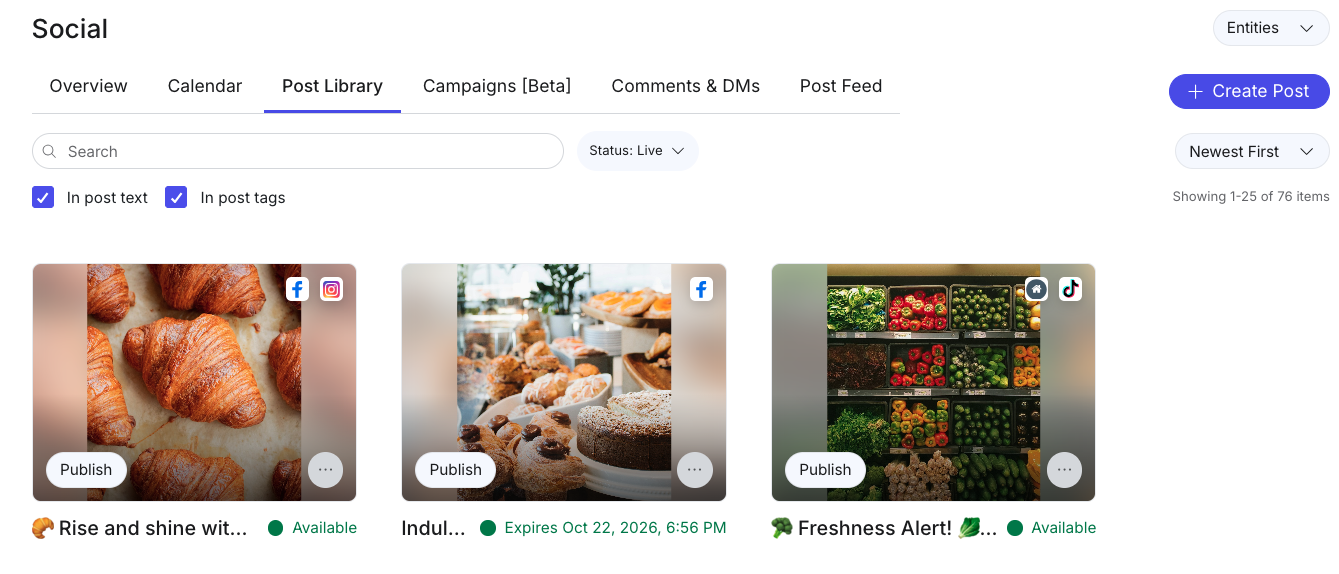
Brand and HQ teams can now build a central library of approved social content that local teams can browse and publish in a few clicks. HQ users create library posts using the existing publisher, target them to specific locations using folders, entities, or labels, and set expiration dates to keep content fresh. Local users open a library post and the publisher pre-fills with its content, ready to publish or schedule.
When creating library content, editors can also set content modification rules to control what local users can change before publishing:
- Media: lock images and videos so local users cannot add or swap them
- Caption and links: lock the caption and hyperlinks together, including any connected fields
- Networks: local users can never add networks beyond those selected on the library post
Access is managed through three role-level permissions for Social within Account Settings > Roles:
- View Content Library: see and publish library content. This is on by default for new roles.
- Manage Content Library: create and edit library content.
- Expire: expire library content.
Social Campaigns (Beta)
Brands can now plan a social campaign once and have it roll out across their locations on schedule, without chasing local teams to post. Brands build the campaign in Social > Campaigns, add posts with publish dates, and choose which locations it’s for.
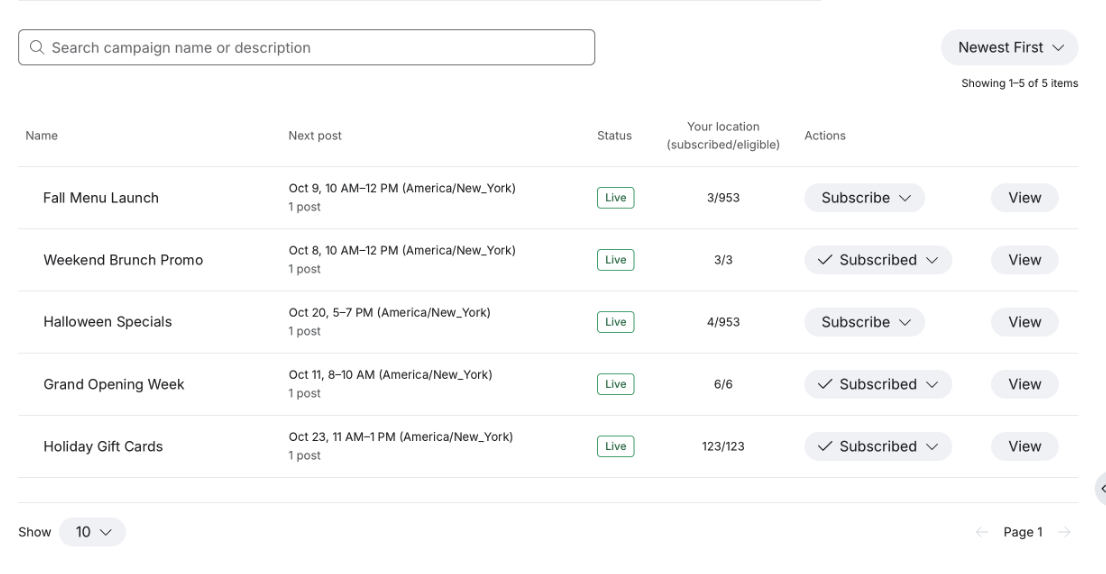
Each campaign is set up one of two ways. Either eligible locations are included by default and local managers can opt out, or participation is optional and local managers subscribe the locations they want. Campaign posts are scheduled automatically for every participating location. Opting a location out or unsubscribing it stops future posts from being scheduled.
Campaign posts appear on the Social Calendar. Brands can also update content for posts that have not yet been published, and changes apply automatically to participating locations.
Facebook and Instagram Story Publishing
Brands can publish Facebook and Instagram Stories directly from Yext Social, using the same scheduling and approval workflow as regular posts. In the post publisher, users select Facebook and/or Instagram, choose the Story format, and add a single image or video. Stories can also be created and scheduled through the public Posts API.
Saved Filters for Social Comments & DMs
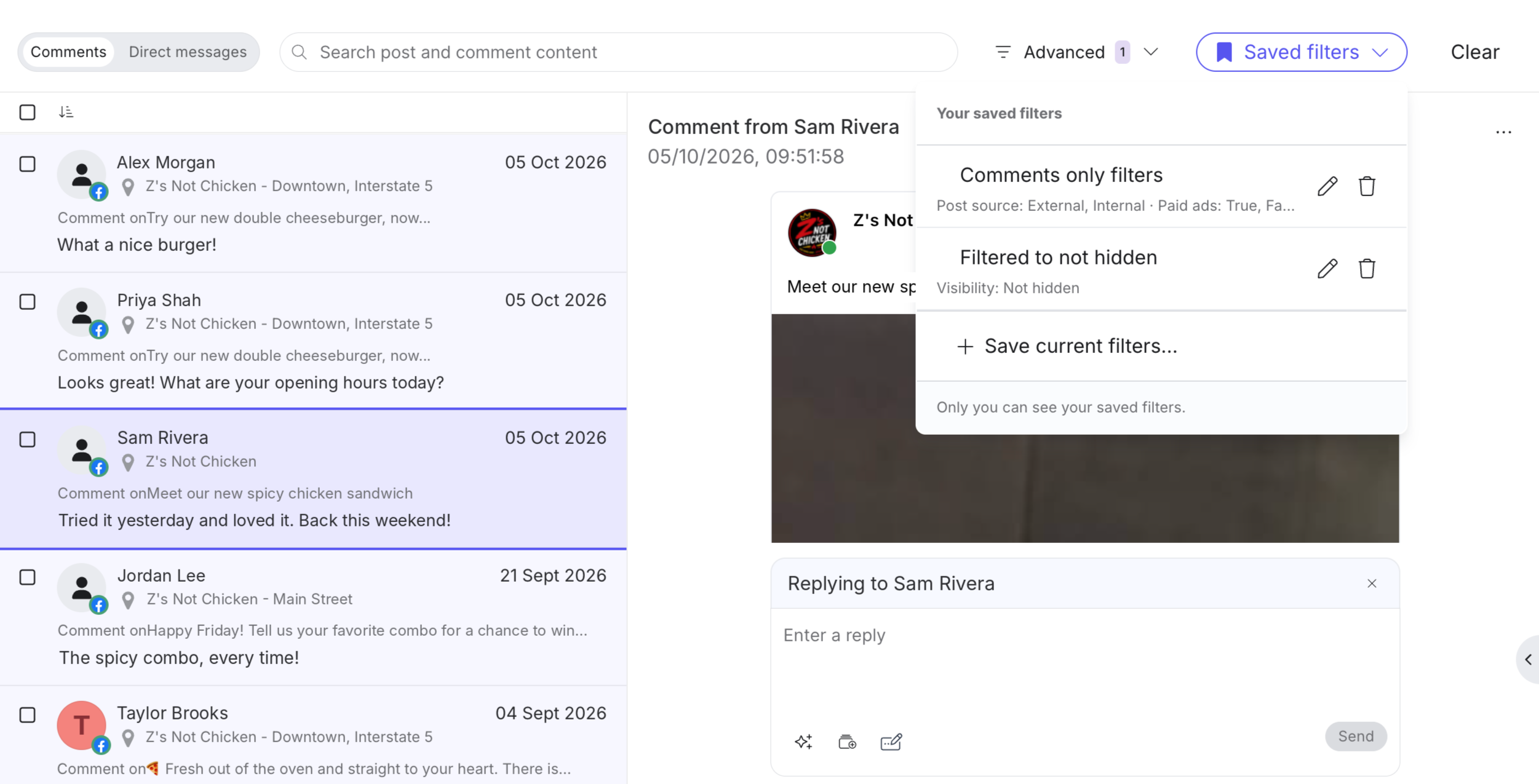
We have added the ability to save filter combinations in Comments and DMs and reapply them in one click, instead of rebuilding filters from scratch each session. This is helpful for brand teams that often look for the same kinds of messages every day, such as questions about insurance, hours, pricing, or locations.
Users can set up their filters, including keyword filters with multiple terms, and save them as a named saved filter that can be selected from the saved filters list at any time.
Knowledge Graph (formerly known as Content)
Enhanced Asset Management
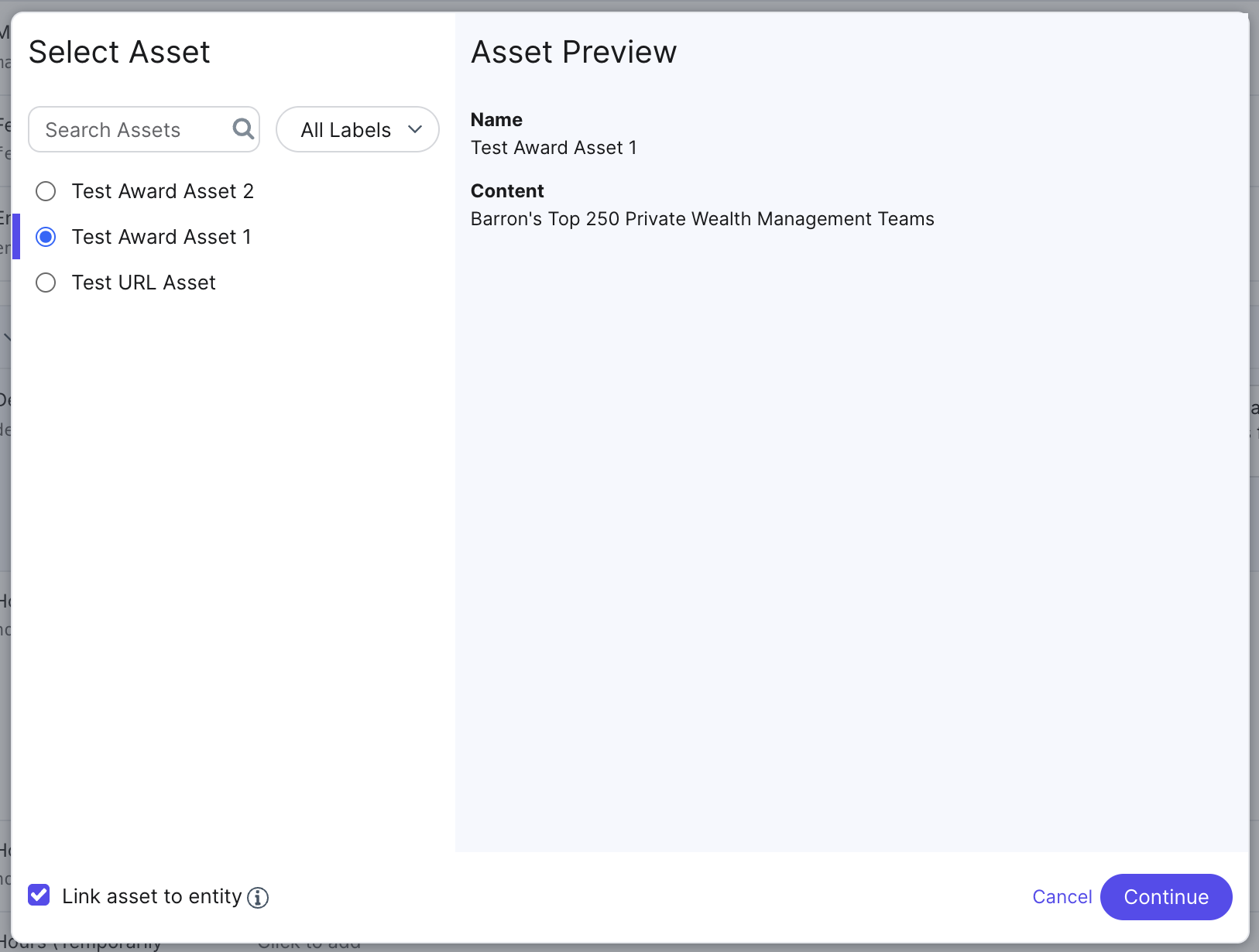
Assets can now be linked to entities, so any updates made to an asset automatically sync across all entities it has been applied to.
When applying an asset to an entity, users now have the choice between two modes:
- Linked Asset: The “Link asset to entity” checkbox is enabled. The asset remains connected to the entity. Any subsequent updates made to the asset will automatically flow through to all linked entities. This is the default mode when a user applies an asset to an entity and is supported across text, photo, video, and custom field asset types.
- Note: Existing assets that have already been applied to entities will not be linked automatically. To use this feature with existing assets, they will need to be re-applied with the linked asset option.
- One-time Update: The “Link asset to entity” checkbox is not enabled. The asset is then applied as a static value. Future changes to the asset will not affect the entity.

Connectors
Normalize Country Transform
Connectors now includes a Normalize Country transform that automatically converts country inputs, such as full country names or alternate code formats, into a standardized two-letter ISO country code. This reduces ingestion errors and ensures consistent country data across location entities.
Users can add the transform within the Connector configuration flow by selecting it from the available transforms and applying it to the relevant field.
Entity Match Transform
Connectors now includes an Entity Match transform that lets users match incoming data to existing Knowledge Graph entities without requiring a unique Entity ID in the source data. Instead, users define matching rules using fields like Name, Address, or custom fields, and the transform searches for a match during execution:
- No match found: the row is skipped and no change is made
- One match found: the input value is replaced with the matched Entity ID
- Multiple matches found: the row is failed with an error to prevent incorrect data mapping
This ensures data consistency and avoids the creation of duplicate entities during the ingestion process.
Missing Entity Run Breaker for Connectors
New connectors created via the UI now include a default run breaker that automatically aborts a connector run if 10% or more of expected entities are missing from the source data. This value is customizable, and protects against accidental mass-deletion or data loss caused by incomplete source files.
Scout
Brand-Level AI Visibility in Scout
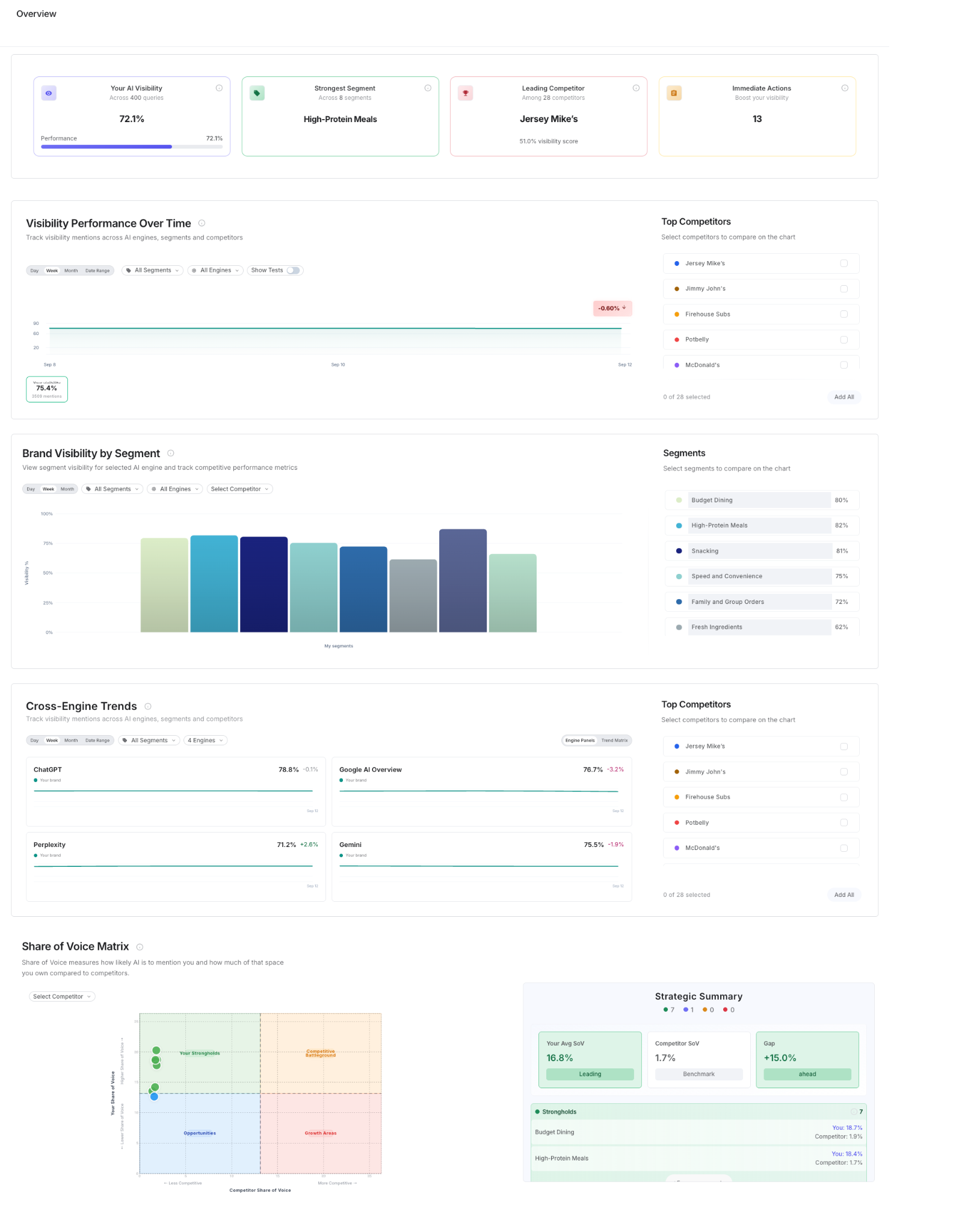
Scout now has brand-level competitive intelligence that allows users to monitor brand AI presence and performance. The new brand agents analyze and extract sources AI engines are selecting for your target queries, identify the content and narrative gaps holding your brand back, and help you produce a prioritized content strategy grounded in that research. From there, the platform generates publish-ready assets and recommendations written in your brand voice, aligned to your positioning, and built specifically for AI retrieval. The brand agents operate under a subscription-based model, allowing customers to scale their competitive monitoring and AI-generated content creation according to their specific business needs.
Scout brand-level visibility metrics are also available via the Yext MCP.
To learn more about brand-level intelligence with Scout, contact your Customer Success Manager.
New in the Yext MCP: Google Reviews Competitive Content Data
Your AI assistant can now read Google review text for every one of your location and compare it with reviews of your local competitors. These reviews show, in customers’ own words, how your brand compares in each market and what each location should promote. Use them to quickly find opportunities by location, gaps against competitors, and sentiment themes. Then turn those into clear recommendations on what to fix, what to highlight, etc.
Try asking:
- “What do customers praise at competitors near our Boston locations that they don’t mention about us?”
- “What should each of our Chicago stores promote in local content, based on reviews?”
- “Build a leadership summary of our biggest gaps against the top-ranked local competitors.”
Requirements: Your AI assistant needs to be connected to the Yext MCP server, and the location needs Scout
Last Scan Date Displayed on Scout Pages & Exports
The Scout Home, AI Performance, and Google Performance pages now display a last scan date so users know how fresh their competitive intelligence data is. An “All data updated as of xx/xx/xx” message appears at the top of each page, reflecting the oldest last scan date across all entities within the selected filters. Exports also now include last scan dates at the location level for more granular visibility into data freshness.
Time Range Filtering for Google Location Performance
Google Location Performance in Scout now supports time range filtering, letting users view performance data for a previous month using the dropdown at the top of the screen. The Google Performance screen also displays the most recent dataset available for the selected period rather than a rollup average, giving a clearer picture of recent performance.
Platform
Email & Campaigns
Email & Campaigns provides Yext customers with a place to create materials and coordinate outreach among email, SMS, and Social channels.
Email allows customers to build polished marketing emails using a template builder, manage contacts and lists, and schedule emails. In addition, customers can view comprehensive delivery and engagement metrics in order to measure email performance. Emails can go through Supervision to help keep communications compliant.
Campaigns enable customers to send a series of emails based on a set schedule or an identified trigger, such as adding a new contact to a list. Campaign sequences can be forked depending on certain conditions. For example, if the recipient opened the last email, end the campaign for them. If they did not open it, send a new email. Campaigns are also available for Social posts (currently in beta) and SMS.
To learn more about Email and Campaigns, contact your Customer Success Manager.
Search
AI Signpost for Search Bar
You can enable an optional AI signpost icon in the search bar to clearly indicate to end users that the search experience is powered by AI. When hovered, the icon displays a popover explaining that search may use AI to find and prioritize results and that responses should be verified.
This is particularly useful for customers in regions with AI transparency requirements, such as the EU. The signpost is enabled via the showAISignpost property in SearchBarProps and can be used alongside the existing Generative Answers signpost.
Smart Location Clustering
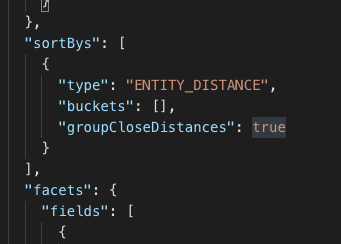
Search results can now normalize distances for locations within approximately 10 meters of each other, treating them as equidistant from a given point. This ensures both locations are consistently returned and sorted by desired fields, covering cases like two ends of the same building or an ATM offset from its primary location. The feature is enabled by adding "groupCloseDistances": true to the sortBys section of the JSON configuration for your Search experience.