Listings
Healthgrades Integration (Listings Sync)
Healthgrades has been added to the publisher network for Listings and Reviews. Users can now manage and update Healthgrades listings with Yext.
- Supported Entity Types: Healthcare Professionals
- Supported Languages: English
To set up Healthgrades listings, you must:
- Ensure you have the proper subscription set up for your account. Healthgrades requires an additional subscription. Reach out to your account team to learn more.
- Have entities set up in your account.
- Opt in to Healthgrades as a publisher for your entities.
Search Tracker Update: Desktop-Only Data for Competitive Intelligence
We’re simplifying Search Tracker by standardizing search results to desktop data only, starting Feb 25, 2026.
Previously, Competitive Intelligence customers received both mobile and desktop search data. After reviewing, we found that the mobile and desktop search results data were almost identical. As a result, including both data sources has been adding unnecessary noise to the All Searches page.
This update is designed to reduce redundancy, simplify analysis, and make Search Tracker insights easier to interpret and act on, without sacrificing data quality.
Publishers
Announcing Location.com
We’re introducing Location.com, Yext’s research platform for traditional and AI search visibility, where we test what actually works in live search environments, measure real-world results, and turn those learnings directly into product capabilities.
Location.com aggregates and displays select location-based entities (location, restaurant, ATM, hotel) from current Listings customers in the US and Canada. Only entities with a physical address are included; service area businesses are excluded.
Current Listings customers in the US and Canada with qualifying entity types are included automatically.
See the Location.com publisher page to learn more.
New Publisher Integration: Yango
Yango has been added to the Yext Publisher Network as a syndicate of Yandex. This means that Yext will send entity data directly to Yandex, and they will determine the information that will be displayed on Yango.
HERE Country Expansion
We have expanded our HERE integration to include Australia.
Expanded Support to Cocos Islands, Christmas Island, and Norfolk Island
The following publishers support locations from the Cocos Islands, Christmas Island, and/or Norfolk Island:
- Naver
- TikTok
- Dianping
- Fliggy
- KaKao
- Mafengwo
- Baidu
- OpenAI
- pinkpages
- Snapchat
- Amap/Gaode
- Brownbook
- Yandex
- Amazon Alexa
- Zenrin
- ShowMeLocal
- TomTom
- Where To?
- AroundMe
- Mapstr
- Mapbox
- MapQuest
- Navmii
- Pitney Bowes
- SafeGraph
- DoorDash
- Foursquare
- American Express
- AussieWeb
- Brave
Publisher Deprecation: Dialo
Dialo has been removed from the Yext Publisher Network. We will no longer be syncing data to this publisher.
Reviews & User-Generated Content
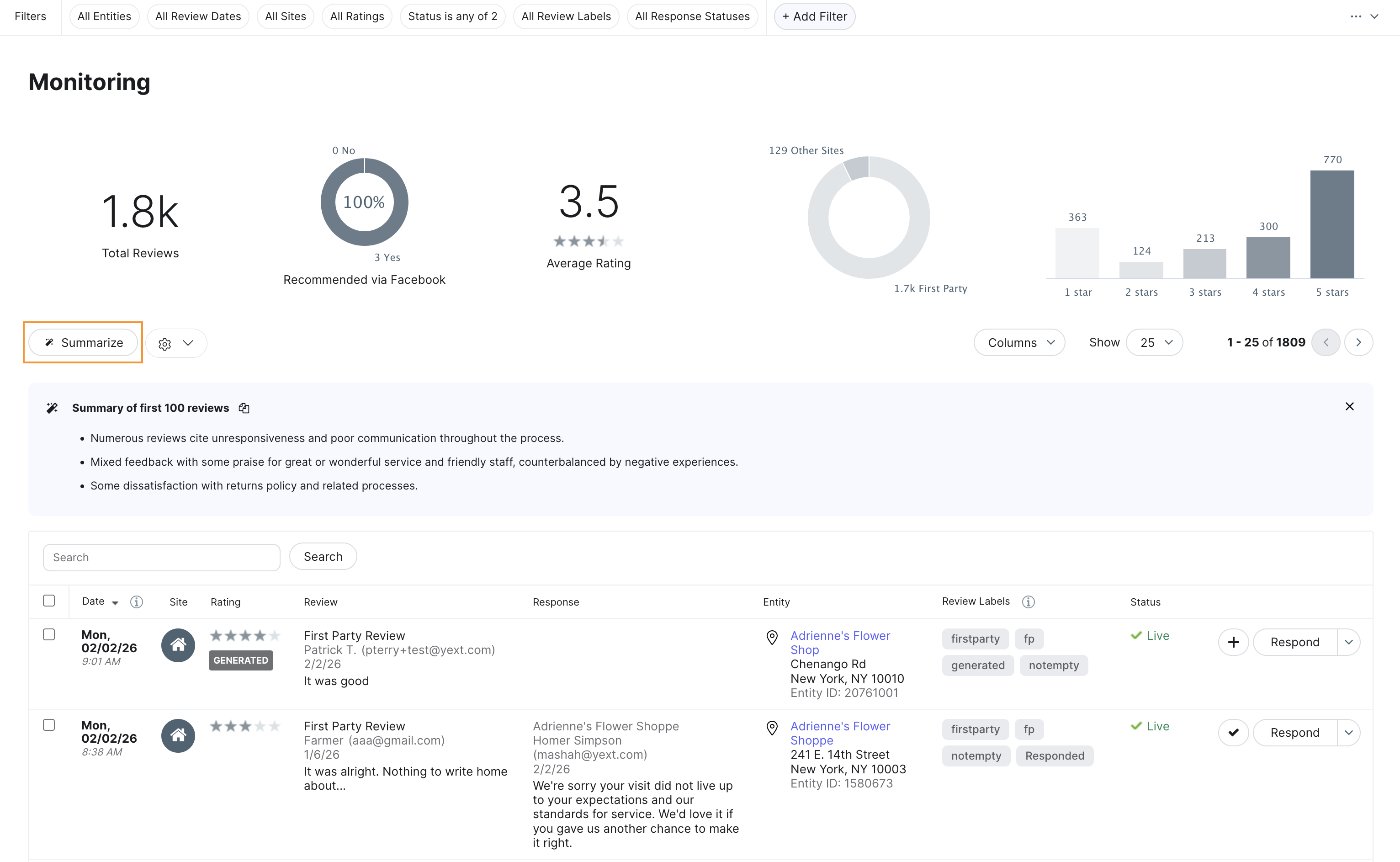
On-Demand Review Summarization
Users can now generate instant, AI-powered summaries of specific subsets of reviews directly within the Review Monitoring page. By clicking the new Summarize button, the platform uses an LLM to distill the most recent 100 reviews in your current view—respecting all active filters such as entity, folder, label, or date range—into a concise overview of key themes and sentiment.
This feature enables operators and leaders to perform ad-hoc analysis on the fly, making it easy to identify emerging issues or local trends without the need for manual data exports. This update expands Yext’s Review Insights beyond account-level summaries, providing granular, contextual intelligence for the exact set of reviews you are analyzing.
Check out the Summarize Reviews on Demand article for more information.
Alternate Reviews Response Time Metric
Users can now access more granular insights into their engagement performance with the introduction of a new review response time metric and updated naming conventions. To provide better clarity and reporting accuracy, the platform now distinguishes between two different measurement methods:
-
Response Time (Hours), Review Timestamp Based: This new metric measures the average time it takes to respond to reviews that were received during a selected time period.
-
Response Time (Hours), Response Timestamp Based: Formerly labeled "Reviews Response Time," this renamed metric measures the average time elapsed for all responses posted during a selected time period.
These updates eliminate ambiguity in performance reporting and allow users to choose the calculation that best aligns with their operational workflows. Both metrics are available in Report Builder.
Check out the Reviews Metrics and Dimensions doc for more information.
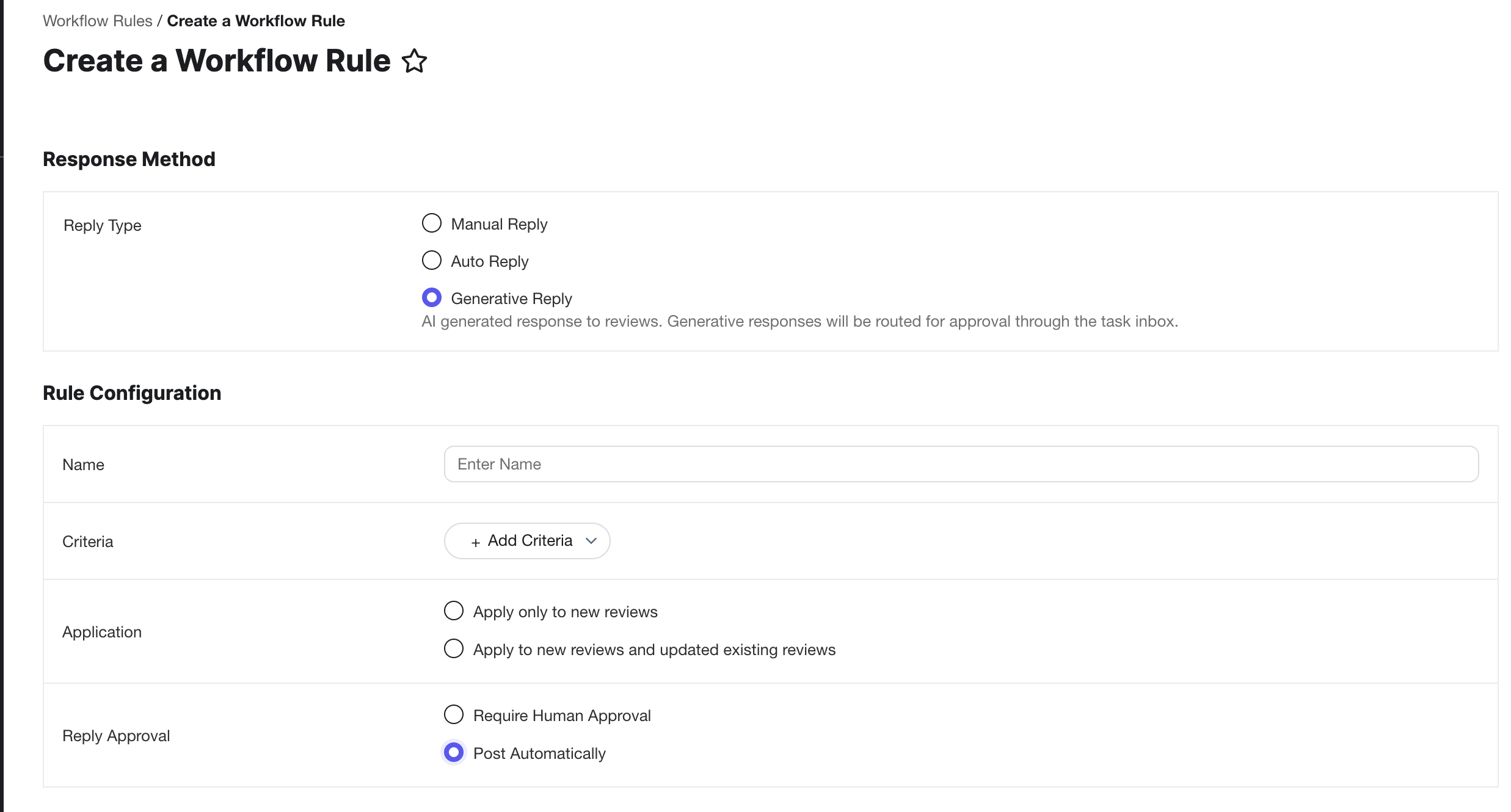
Generative Review Response Approval Opt-Out
Users can now fully automate their review response strategy by opting to bypass the human approval step within Generative Review Response workflow rules. By selecting the new Post Automatically option in the workflow rule settings, eligible reviews that meet your predefined criteria—such as specific ratings, publishers, or sentiment—will receive an AI-generated response that is published immediately.
This update significantly reduces manual effort and response latency, making it easier for high-volume accounts to maintain consistent, brand-aligned engagement at scale. While this allows for a touchless workflow, customers retain full control through configurable eligibility rules and existing AI guardrails. If the bypass option is not selected, the workflow will continue to route responses for manual review, ensuring you can choose the right level of automation for your business.
See the Review Response Workflow Rules documentation to learn more.
Assign User Groups within Generative Review Response Workflows
You can now assign user groups as approvers when creating Generative Reply workflow rules. When a user group is selected as the approver, all members of that group are notified and can review the resulting Review Response task, but only one person needs to approve or reject it for the task to be completed.
In the Tasks Inbox, one member of the group is shown as the primary assignee, while the rest of the group appears as collaborators. This allows the whole team to have visibility into the work.
To assign a user group to a Generative Review Response Workflow, first navigate to Inbox > Workflow Management to start creating a Review Workflow. For the Generative Reply type, you must select the Require Human Approval option for the Reply Approval field. This will allow you to assign an approver using the drop-down or search functionality.
See the Review Response Workflow Rules documentation to learn more.
Fetch Updated Review Date from Google
Users can now see more accurate timestamps for Google reviews that have been modified by the reviewer in the Review Monitoring and Review Response tabs. The Date column now includes the latest user-driven activity, such as edits to a review’s rating or content, in addition to original post dates and business response dates.
This update ensures review data in Yext remains consistent with Google, allowing users to better identify and prioritize new activity. The original post date remains available in the Review Date column for historical tracking.
Integrate Yext Reviews into Hearsay Compliance
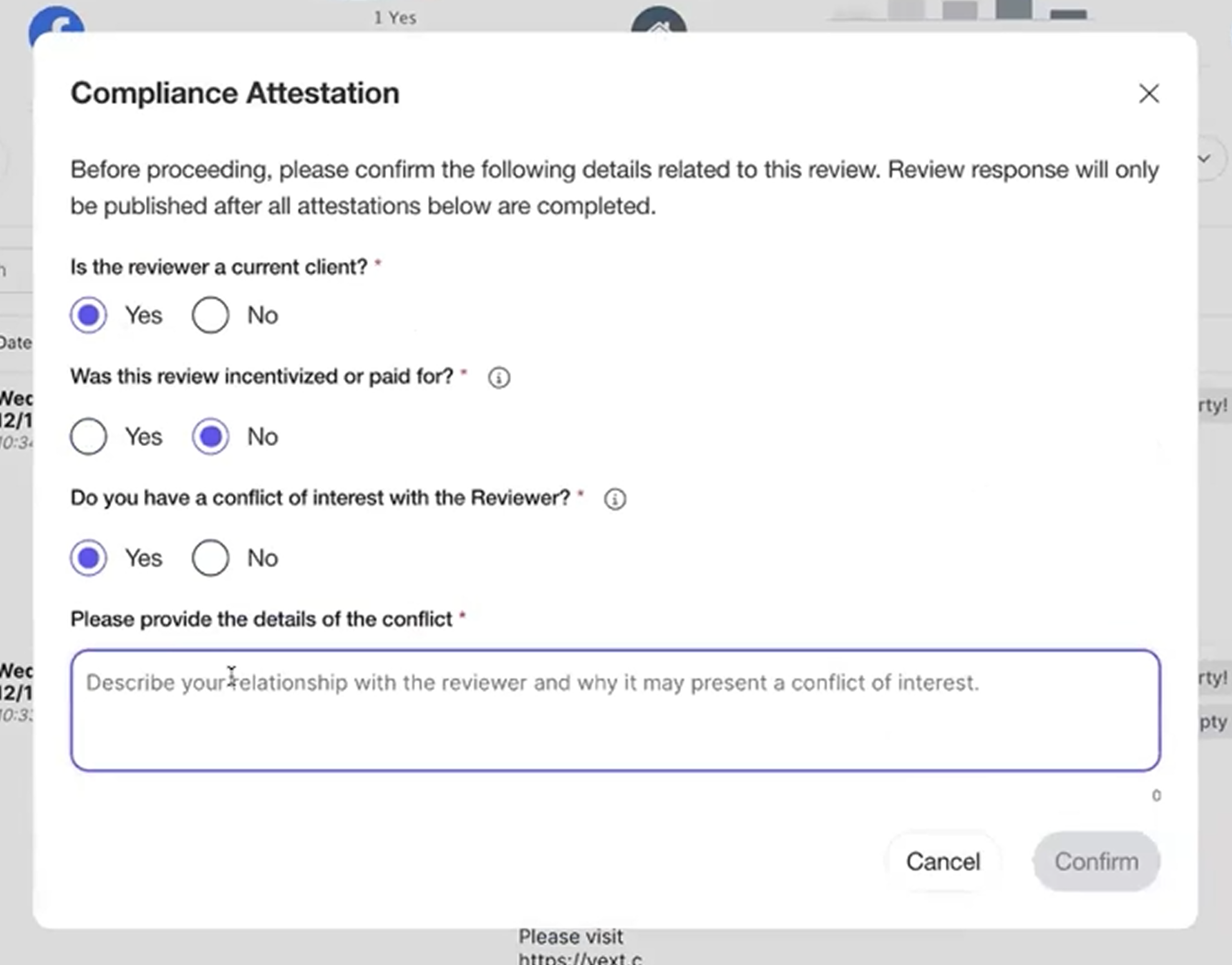
Financial advisors can now manage review responses through a SEC-compliant workflow with Hearsay Compliance. This integration enables financial advisors to fulfill regulatory requirements by completing mandatory attestations and routing responses for approval before they are published to listings.
Once the integration is enabled in Compliance Settings, advisors will be prompted with compliance questions for each review response (see screenshot below). Approved responses are automatically updated with required disclosures and synced back to Yext, while rejected content is replaced with negative disclosure language. All reviews, responses, and compliance actions are archived in Hearsay as permanent books and records.
Note: This feature requires users to have matching email identifiers in both Yext and Hearsay.
Healthgrades Integration (Review Monitoring/Response)
Our new Healthgrades integration allows healthcare providers to monitor and respond to patient reviews directly within the Yext platform. By centralizing your reputation management, you can maintain a consistent digital presence and engage with patient feedback more efficiently. This direct API integration replaces older scraping methods, providing a more reliable and comprehensive history of your reviews to ensure no patient voice is overlooked.
Please note that this integration is currently available for US-only providers. New reviews are pulled into the platform on a weekly scan cadence, and there may be an initial transition period of up to two weeks for your full review history to populate. To get started, simply ensure your Healthcare Professional entities have the Review Monitoring and Review Response packages assigned.
Social
TikTok Posting
Social customers can now create and publish TikTok content directly from Yext, alongside their existing Social workflows. TikTok posts can be created via the Calendar once you select + New Post.
With TikTok supported as a first-class channel, customers can extend their organic reach on a leading short-form video platform, maintain a consistent brand presence, and manage TikTok posts in the same Social Calendar used for other networks.
This initial release supports core publishing capabilities, including:
- Creating and publishing videos and multi-image carousels
- Previewing how posts will appear on TikTok
- Using AI-generated captions to speed up content creation while adhering to TikTok’s content and music usage policies
See the TikTok Posting documentation to learn more.
This feature is available as part of Yext Social.
Pages
Custom Font Uploading for Sites
Users can now utilize custom brand fonts on their Pages sites for greater design flexibility and brand consistency. To get started, provide your font files to your Yext representative. Once our team uploads the files to your account, these custom fonts will appear directly in the font selection dropdowns within the theme editor and can be applied site-wide or to individual components.
Duplicate Page Groups & Layouts
Users can now replicate existing Page Groups and Layouts to significantly accelerate the creation of new content, reduce manual setup, and ensure design consistency across your site. This update provides two ways to reuse your work:
-
Duplicate Page Groups: Clone an entire page group, including its layout, entity scope, and all configuration. Select Duplicate Page Group from the Page Groups table. Be sure to update the URL path template and entity scope as needed before saving.
-
Duplicate Layouts: Copy a specific layout and paste it into a different page group. When viewing a layout, click Copy Layout, navigate to the target page group, and click Paste Layout.
These capabilities streamline workflows for creating similar or derivative page groups, such as intent pages, without rebuilding from scratch.
Check out the Duplicate Page Groups and Layouts article for more information.
Brand Certified Facts for Pages
We’ve introduced Brand Certified Facts (BCF) to Yext Pages, a new verification layer that adds digitally signed, cryptographic proof to your business data. By embedding these signatures directly into your page's schema markup, you provide search engines and AI systems with authoritative, verifiable evidence that your information is current and brand-verified. Yext Research has shown this increased trust drives significant results, including up to a 9% lift on Google Gemini and up to a 37% lift on Bing and Yahoo.
BCF works behind the scenes by signing key fields, such as name, address, phone number, and hours, using the W3C Verifiable Credentials standard. These signatures automatically regenerate whenever you update your data in the Knowledge Graph, ensuring AI models always have access to the most reliable information.
Implementation:
- New Pages (In-Platform): BCF is enabled automatically; no action is required.
- React Pages: Developers must add a code commit to the location template to support the signatures (see instructions here). React customers managed by Yext will have BCF rolled out for free by the end of March.
- Content API: BCF is also available via the Content API for customers building pages outside of the Yext platform (see instructions here).
Note: Brand Certified Facts are currently not supported on Classic Pages or Page Builder.
Visual Editor Improvements
We've rolled out a series of enhancements that significantly improve site customization and component management. Update your library to access these improvements today. Learn how in the Get Started with Pages for Marketers guide.
New Components and Variants
- Professionals Sections: Two new components have been added specifically for professional entity types like financial advisors. The Professional Hero displays advisor credentials and contact details, while the About Section provides a structured layout for professional bios.
- Promo Section Variants: Choose from four new design layouts for the Promo section, including Classic, Spotlight, Immersive, and Compact.
- Photo Gallery Revamp: A new gallery display mode is now available alongside the existing carousel, providing a more effective way to showcase multiple images simultaneously.
Advanced Styling and Localization
- Enhanced Styling Controls: We’ve introduced more granular styling options across the platform. Users can now apply Global Text Transformation (e.g., forcing all-caps) to header fields and utilize additional color options for CTAs and Heading Text based on their brand palette.
- Products Section Styling: New styling variants for the Products section offer additional control over spacing, layout, and visual treatment of product displays.
- Localized Images and Links: To better support multi-language sites, images and CTA links can now be localized, ensuring that regional content and assets are served to the correct audiences.
Usability and Navigation
- Advanced Link Behavior: Links now support an "Open in new tab" property. When enabled, the link will automatically include an external link icon and open the destination in a new browser tab.
- Navigation and Outline Toggling: A new left-rail navigation allows users to quickly toggle between the Sections library and the Layout Outline, streamlining the editing experience.
- Additional Content Options: We have added more Food Delivery Icon options for CTAs and enabled the Header Logo to function as a clickable link.
Knowledge Graph (formerly known as Content)
Configure Scope Encoding in Custom Providers
Users can now control whether scopes are URL-encoded when creating or editing custom providers for account linking.
Some external providers, such as Microsoft, require non-encoded scopes for successful authentication. This update ensures compatibility with those providers and reduces friction when setting up custom integrations.
When you opt to create a custom provider from the Knowledge Graph > Configuration > Linked Accounts screen, there is a URL Encode Scopes toggle available in Advanced Settings. By default, scopes remain URL-encoded. Users can disable encoding when required by their provider (e.g., using /.default instead of %2F.default)
Connectors
Entity Auto Scan
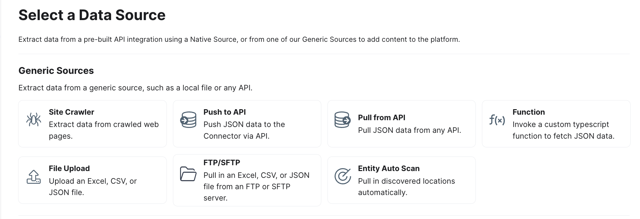
Entity Auto Scan allows customers to scan the internet to source and ingest potential location entities directly into the Knowledge Graph.
By automatically populating the Knowledge Graph with entity data, customers can quickly set up and utilize downstream systems such as Listings, Pages, Search, Chat, and Scout.
To utilize Entity Auto Scan:
- Navigate to Knowledge Graph > Connectors.
- Select the Entity Auto Scan option.
 Fill out your brand details and a minimum confidence level.
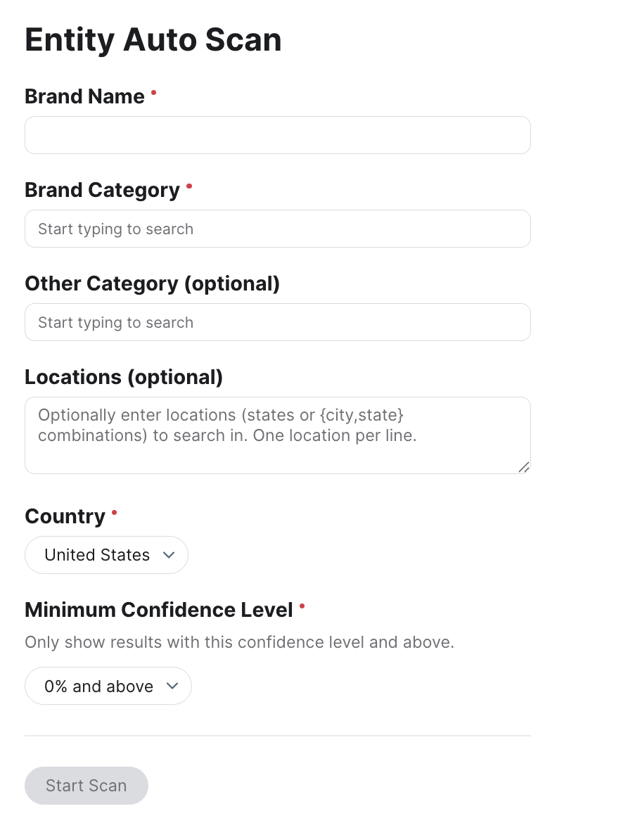
- Click Start Scan.
Flexibility in Categories Field Value Formats
We’ve improved the Connector system to support more flexible data formats, significantly reducing the need for custom transforms when importing data. Users can now map key fields—including Categories, Labels, Options, Entity Types, and Folders—using either the Display Name or the External ID.
Previously, these fields often required manual transformation to match specific API formats. With this update, the system supports both formats out-of-the-box. For example, when mapping "Options" fields, you can now use the user-friendly Display Name (the same value returned in an Entity Export) rather than being restricted to the internal API name. These enhancements make the ingestion process more intuitive and extendable across various data sources.
Platform
Yext & Hearsay Navigation Bridge
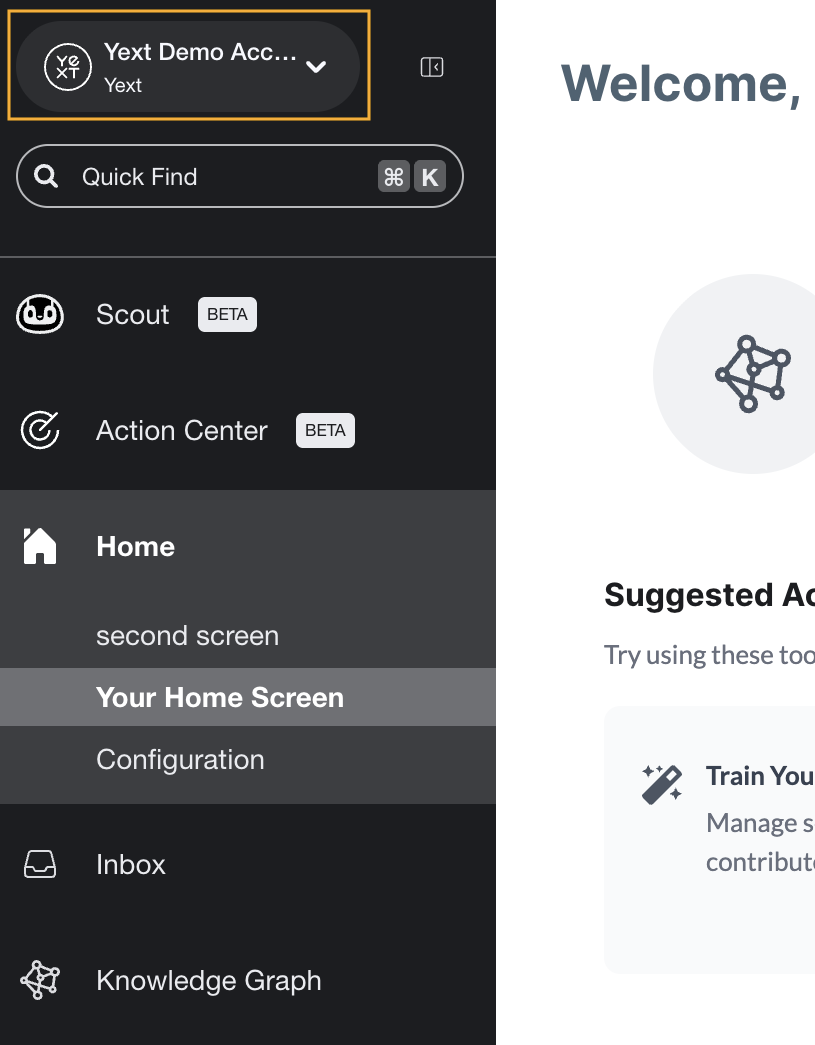
We’ve released the Yext & Hearsay navigation bridge, which enables eligible users to seamlessly switch between Hearsay and Yext products from a single, consistent interface.
This feature is available only to customers who are licensed for products in both the Yext and Hearsay product families.
To see the navigation bridge in your accounts, you will need to reach out to Yext Support to have it enabled. If it has not been enabled, your navigation will remain unchanged.
Once enabled, users who have active access to both Yext and Hearsay products will see the navigation bridge in the top left corner of the navigation bar. Users who only have access to one platform (for example, Hearsay-only users) will not see the navigation bridge.
Deprecated SSO Allowed Login Types
In the December ’25 release, we announced that we will update our SSO configuration to always support both SP-initiated and IDP-initiated login types. This ensures a more user-friendly experience by allowing users to log in from either their Identity Provider (IDP) or from Yext’s login page.
As a result, we have deprecated DP-initiated Only or SP-initiated Only allowed login types. Any existing accounts using one of these deprecated login types will automatically be migrated to the IDP-initiated and SP-initiated option.
If you do not have the information required for SP-initiated SSO, you will still need to provide the required configuration for the SP-initiated login flow to work. You can provide this information on the Account Settings > SAML Configuration screen.
See the Configure SAML SSO guide to learn more.
Rich Text Editor for Email Notifications
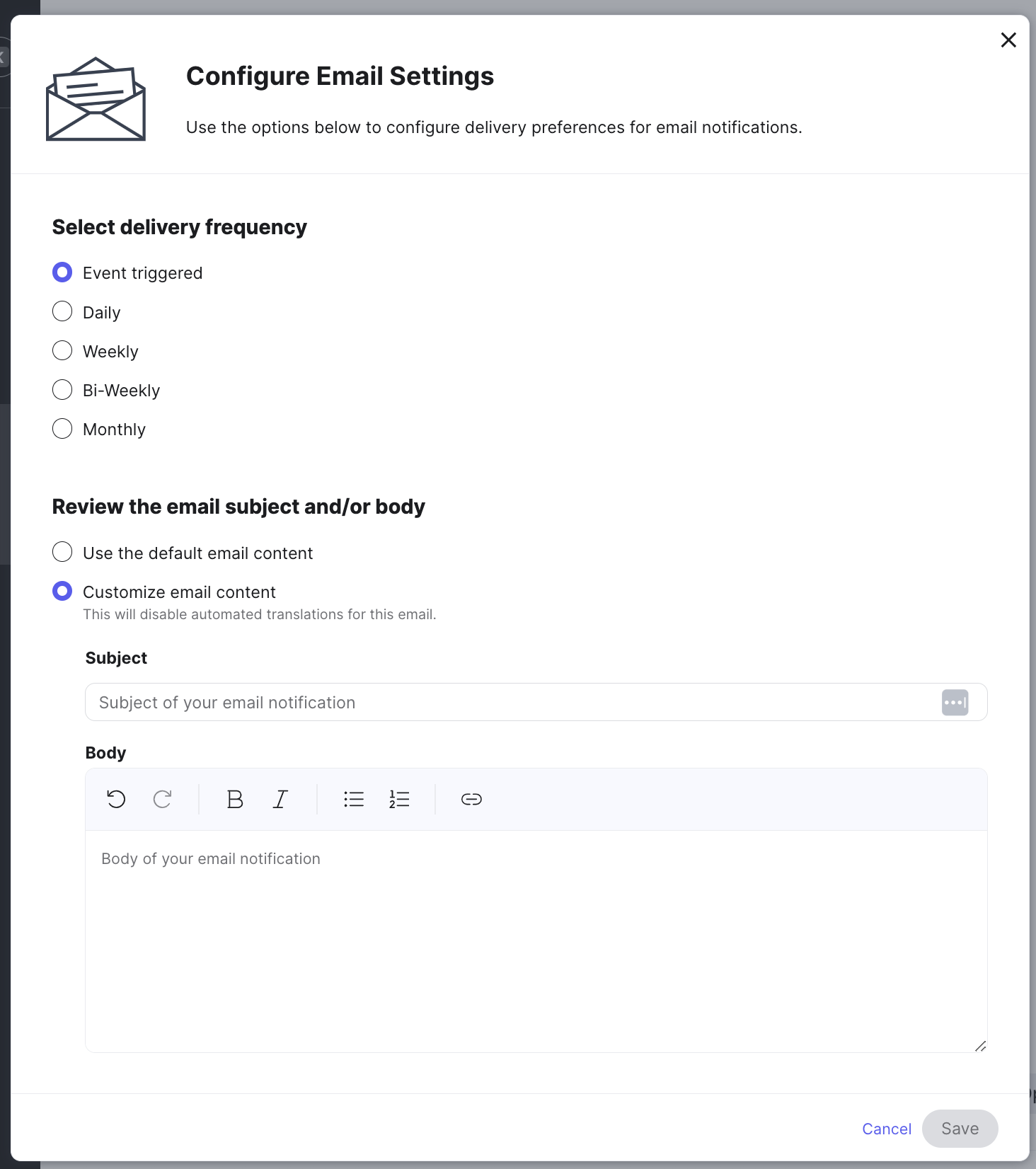
We have added a rich text editor that allows you to customize the content within notification emails. You will have the option to format your email body with options like bold, italics, underline, hyperlinks, and spacing. This gives you more control over the look and feel of your notifications, so they better match your brand voice and customer needs.
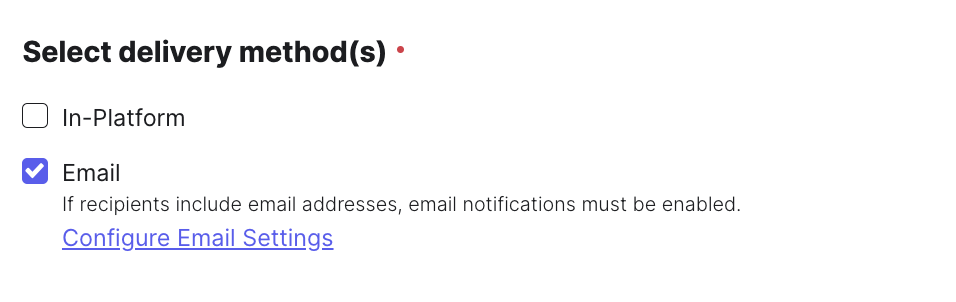
Within Account Settings > Notifications, you can create or edit notifications you want to add email customization to by selecting the Email delivery method and then Configure Email Settings. From there, you can opt to customize the email content to edit the body of the email with the Rich Text Editor.
Brand Visibility Mobile App
On January 20, 2026 we launched a mobile app to support white-labeling for resellers. This app will have new app store listings with a generic name (Brand Visibility), a generic app description, and logo.
Currently, this mobile app has the same functionality as the Scout by Yext app. The main difference is that the app icon can be customized. In order to update the icon, the icon image must be sent to your Yext account team.
You can download the app in the Google Play Store and App Store.
Search
Search SDK React 19 Support
The Search UI React SDK now officially supports React 19. This update ensures that developers can build custom search experiences using the latest version of the React ecosystem without encountering compatibility issues.
By supporting React 19, the SDK allows your search interfaces to stay aligned with modern development standards and benefit from the latest performance improvements in the React framework. To get started, upgrade your project dependencies to include the latest version of the Search UI React SDK.
Generative Answers Model Upgrade
We have upgraded the underlying models powering Generative Answers to leverage the latest advancements in generative AI. All experiences using Generative Answers have been transitioned from GPT-4o to GPT-5-nano, ensuring higher quality responses and improved overall functionality.
This update keeps the platform aligned with state-of-the-art generative technology, providing users with more accurate and reliable answers. No setup or configuration is required, as the upgrade has been automatically applied to all eligible search experiences.